# MapEditor
**Repository Path**: alsritter/map-editor
## Basic Information
- **Project Name**: MapEditor
- **Description**: 在线地图编辑器,目标是结合 WebGL 做个在线马造
- **Primary Language**: Unknown
- **License**: Apache-2.0
- **Default Branch**: master
- **Homepage**: None
- **GVP Project**: No
## Statistics
- **Stars**: 10
- **Forks**: 4
- **Created**: 2021-02-17
- **Last Updated**: 2024-12-31
## Categories & Tags
**Categories**: Uncategorized
**Tags**: None
## README
MapEditor
为游戏开发者设计的地图生成器,它为简化开发、提高效率而生



## 在线访问
在线展示地址 https://alsritter.gitee.io/map-editor-online
⚠ 注意:本工具不对移动端进行适配
## 基本功能介绍
### 导入导出数据 💾

### 选择使用的砖块 🗃
选择你使用的砖块

### 选择工作的图层 📌
默认情况下(可以以自己的方式解析数据):
1. *Background:背景层,不与玩家交互*
2. *Collision:碰撞层*
3. *Traps:陷阱图层*
4. *Foreground:遮挡在角色前面的图层*

### 设置地图大小

### 选择绘图工具 📐

这些工具的作用:
* *Pen Tool:默认的笔工具,一次绘制一个方块*
* *Draw Area Tool:绘制一个区块的方块*
* *Fill ALL Tool:油漆桶工具,用于覆盖图层*
* *Fill Area Tool:用于填满空隙*
* *Replace Tiles Tool:替换砖块*
* *Erase Tool:擦除当前方块*
* *Erase Area Tool:擦除一个区块*

设置出生点以及终点
## 如何工作的? 🤨
下面介绍一些工作原理,对这部分不感兴趣的可以直接跳过啦~
### 绘制网格
```html
```
### 鼠标绘制颜色
注意:鼠标事件能获取的坐标信息有三个,page、offset、client这里得使用 offset,否则会出错
```js
console.log('page: ', e.pageX, e.pageY)
console.log('offset: ', e.offsetX, e.offsetY)
console.log('client: ', e.clientX, e.clientY)
```
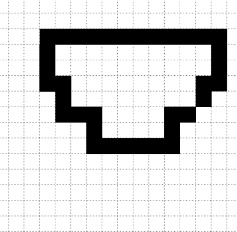
```js
const map = []
// 先初始化 map
for (let y = 0; y < _rows; y++) {
const temp = []
for (let x = 0; x < _cols; x++) {
temp.push(0)
}
map.push(temp)
}
// 监听鼠标事件,判断当前点击了哪个格子
canvas.onmousedown = (e) => {
const x = Math.floor(e.offsetY / _space)
const y = Math.floor(e.offsetX / _space)
// 点击更新该区域的编号
map[y][x] = 1
// 刷新画布
for (let y = 0; y < _rows; y++) {
for (let x = 0; x < _cols; x++) {
if(map[x][y] !== 0) {
// 绘制
ctx.fillRect(x * _space, y * _space, _space, _space)
}
}
}
}
```
## 取色板 📕
### 切割地图集
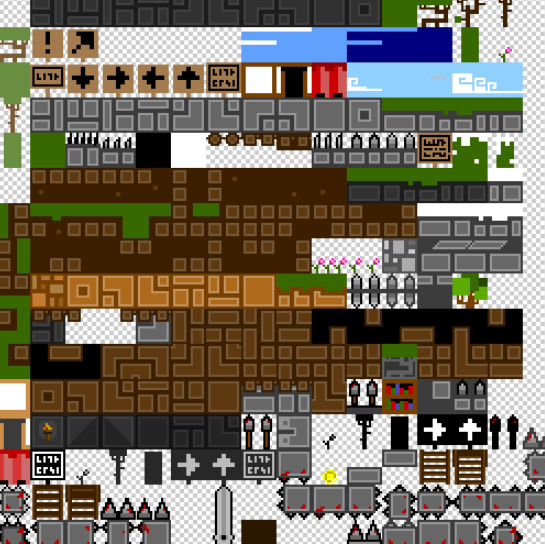
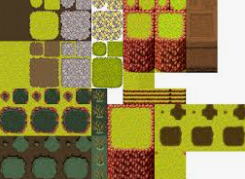
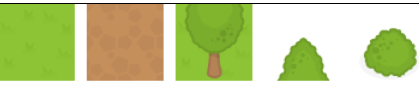
存储 Tileset 最有效的方式是地图集或子画面表。这是在单个图像文件中分组在一起的所有所需磁贴。当需要绘制磁贴时,游戏画布上仅呈现此较大图像的一小部分。如下 RPGMaker 就是使用的 Tileser
这里提供教程所用的 Tileset

第一步就是将这个地图集切开(这里直接演示如何取得数据,实际在下一节才正式开始使用)
```js
function draw() {
let ctx = document.getElementById('canvas').getContext('2d')
let img = new Image()
img.onload = () => {
let tileColsNum = 5; // 图的宽度,以列表示
let tileRowsNum = 1; // 图的高度,以行为中
let sWidth = img.width / tileColsNum; // 切图的宽度
let sHeight = img.height / tileRowsNum; // 切图的高度
for (let col = 0; col < tileColsNum; col++) {
for (let row = 0; row < tileRowsNum; row++) {
ctx.drawImage(img,
col * sWidth, // 开始切的 X 位置
row * sHeight, // 开始切的 Y 位置
sWidth, sHeight, // 切的高度和宽度
col *( sWidth + 10) , row * sHeight, // 显示的位置
sWidth, sHeight) // 显示的高度和宽度
}
}
}
img.src = './src/img/tiles.png'
}
window.addEventListener('load', draw, false)
```
绘制效果如下
### Map 取得格子位置
```js
// 根据鼠标点击取得格子
canvas.onmousedown = (e) => {
console.log(map[Math.floor(e.offsetY / _space)][Math.floor(e.offsetX / _space)])
}
```
### 绘制方格背景

```js
/**
* 绘制背景方格
* @param {CanvasRenderingContext2D} ctx 传入 canvas 的 Context
* @param {Number} width 画布的宽度
* @param {Number} height 画布的高度
*/
static drawBackground(ctx, width, height) {
let emptyBox = ctx.createImageData(width, height)
let emptyBoxData = emptyBox.data
// 通过 canvas宽高 来遍历一下 canvas 上的所有像素点
for (let i = 0; i < height; i++) {
for (let j = 0; j < width; j++) {
let point = (i * width + j) << 2 // << 相当于 * 4
let rgbData = ((i >> 2) + (j >> 2)) & 1 ? 204 : 255 // >> 2 相当于 / 4 取整, & 1相当于 % 2
emptyBoxData[point] = rgbData
emptyBoxData[point + 1] = rgbData
emptyBoxData[point + 2] = rgbData
emptyBoxData[point + 3] = 255
}
}
ctx.putImageData(emptyBox, 0, 0)
}
```
### 存储 Tile贴图中格子的位置
要存储该图数据,可以使用一个自定义类
```js
/**
* 单个 Tile 在图片的位置
*/
class Tile {
/**
* Tile 在贴图里面的位置,以及保存它的路径偏移量(贴图位置和路径偏移量无关,后者是保存它显示在屏幕的位置)
* @param {Number} x Tile 在贴图里的起始 x
* @param {Number} y Tile 在贴图里的起始 y
*/
constructor(x, y) {
this.x = x
this.y = y
}
}
/**
* TileImage 里面的 Tile
*/
export class TileMap {
/**
*
* @param {Number} cols Tile贴图的宽度(一列有多少个 Tile)
* @param {Number} rows Tile贴图的高度(一行有多少个 Tile)
* @param {HTMLImageElement} img 这里传入的 Tile 贴图,必须放在 onload 里面执行
*/
constructor(cols, rows, img) {
this.cols = cols
this.rows = rows
this.img = img
this.tiles = []
this.sWidth = 0 // 每个单元格的宽度
this.sHeight = 0 // 每个单元格的高度
this.sWidth = this.img.width / this.cols // 切图的宽度
this.sHeight = this.img.height / this.rows // 切图的高度
for (let col = 0; col < this.cols; col++) {
for (let row = 0; row < this.rows; row++) {
this.tiles.push(new Tile(col * this.sWidth, row * this.sHeight))
}
}
}
/* 省略一堆 getter */
}
```
### 鼠标获取 Tile
需要实现一个鼠标移动到某个 Tile 上面就能获取对应的 Tile 编号
注意:鼠标事件能获取的坐标信息有三个,page、offset、client这里得使用 offset,否则会出错
```js
console.log('page: ', e.pageX, e.pageY)
console.log('offset: ', e.offsetX, e.offsetY)
console.log('client: ', e.clientX, e.clientY)
```
主要就用到这三个事件:onmouseup、onmouseout、onmousedown
```js
// 监听鼠标事件,松手时刷新画布
canvas.onmouseup = (e) => {
ctx.clearRect(0, 0, canvas.width, canvas.height)
DrawUtility.drawAllTile(ctx, map, posList)
}
// 移出画布也刷新
canvas.onmouseout = (e) => {
ctx.clearRect(0, 0, canvas.width, canvas.height)
DrawUtility.drawAllTile(ctx, map, posList)
}
// 监听鼠标事件,判断当前点击了哪个区域
canvas.onmousedown = (e) => {
for (let index = 0; index < map.getTiles().length; index++) {
if (
ctx.isPointInPath(
posList.getTilePosOfArray(index).path,
e.offsetX,
e.offsetY
)
) {
console.log(`点击了 ${index}`)
DrawUtility.drawDarkTile(ctx, posList, index)
}
}
}
```
## 事件功能 📬
因为涉及到很多的状态改变,例如更换了图层,导入了新数据,显示模式改变了等等问题,所以需要使用事件来将它们解耦,控制层只需监听某一时间的发生就行了
例如遇到某种状态改变了需要发出刷新事件
```ts
// 监听显示模式(这里对 Vuex 的值进行监听)
$store.watch(
() => $store.state.isShowAllLayer,
val => {
isShowAll = new Boolean(val).valueOf();
window.dispatchEvent(new CustomEvent("refreshData")); // 通知更新数据
}
);
```
而在控制层对这个事件进行监听刷新
```ts
// 定义一个刷新事件的监听
window.addEventListener("refreshData", () => {
// 这里进行刷新操作
});
```
## 实现撤回功能
这个撤回实际上就是一个入栈和出栈的过程,因此自己维护一个栈就行了
```ts
import Grid from "./VO/Grid";
/**
* 自定义的栈结构,主要用来维护 画布数据
*/
export default class MapStack {
private arr: Array<{ layer: number; map: Grid[][] }>;
constructor() {
this.arr = [];
}
/**
* 压栈操作
* @param { { layer: number, map: Grid[][] }} mapInfo
*/
push(mapInfo: { layer: number; map: Grid[][] }): void {
this.arr.push(mapInfo);
}
/**
* 退栈操作
*/
pop(): { layer: number; map: Grid[][] } {
return this.arr.pop() as { layer: number; map: Grid[][] };
}
/**
* 获取栈顶元素
*/
top(): { layer: number; map: Grid[][] } {
return this.arr[this.arr.length - 1];
}
/**
* 清空栈
*/
clear(): boolean {
this.arr = [];
return true;
}
}
```
每次写入后要及时入栈
然后再在控制层去监听 Ctrl + Z
```ts
// 监听撤回键(使用栈)
document.onkeydown = e => {
if (e.ctrlKey == true && e.key == "z") {
// 如果栈内不为空才撤回
if (recallMap.size() !== 0) {
// 弹栈
const temp = recallMap.pop();
gridManagerArray[temp.layer].setMap(temp.map);
window.dispatchEvent(refreshEvent); // 通知更新数据
}
}
};
```
## 区域更新
如果每一帧都刷新全部数据会浪费很多性能,而且有多层数据就更雪上加霜了
创建一个 cacheMap 来记录修改了的位置,它会在下一帧更新
```ts
import BasePos from "./VO/BasePos";
export default class CacheMap {
private cols: number;
private rows: number;
private map: boolean[][];
constructor(cols: number, rows: number) {
this.cols = cols;
this.rows = rows;
this.map = [];
// 每个数组都需要先初始化 默认是 false
for (let i = 0; i < rows; i++) {
const temp: boolean[] = [];
for (let j = 0; j < cols; j++) {
temp.push(false);
}
this.map.push(temp);
}
}
/**
* 返回被修改的位置
* @returns {ModifiedPos[]} 里面是被修改的位置,需要被更新
*/
getChange(): BasePos[] {
const list: BasePos[] = [];
// 如果有被修改的则把这个位置添加到 List 里面
for (let i = 0; i < this.rows; i++) {
for (let j = 0; j < this.cols; j++) {
if (this.map[i][j]) {
list.push(new BasePos(i, j));
}
}
}
return list;
}
/**
* 标识这个地方被修改了
* @param x 被修改的 x 坐标
* @param y 被修改的 y 坐标
*/
setChange(x: number, y: number): void {
this.map[x][y] = true;
}
/* ............. */
/**
* 当更新完成之后要归零
*/
cleanChange(): void {
for (let i = 0; i < this.rows; i++) {
for (let j = 0; j < this.cols; j++) {
this.map[i][j] = false;
}
}
}
}
```
而在将每一帧刷新数据,改成只有 Cache 改变后才进行重新渲染
```ts
// 局部刷新
const modif = cacheMap.getChange();
for (let i = 0; i < modif.length; i++) {
// 先清空指定的位置
DrawTools.clearTile(
ctx,
space,
gridManagerArray[layer].getGrid(modif[i].x, modif[i].y).x,
gridManagerArray[layer].getGrid(modif[i].x, modif[i].y).y
);
// 因为有多层数据,所以这里遍历刷新每一层的这个位置
for (let j = 0; j < gridManagerArray.length; j++) {
RendererTools.changeTile(
gridManagerArray,
j,
modif,
i,
tileManager,
ctx,
space
);
}
// 更新完成后要归零
cacheMap.cleanChange();
```
## 填色算法
PS 中的油漆桶其实一般用作填色,例如点击这个画好的圈里面会自动填满它而不会跑到外面来
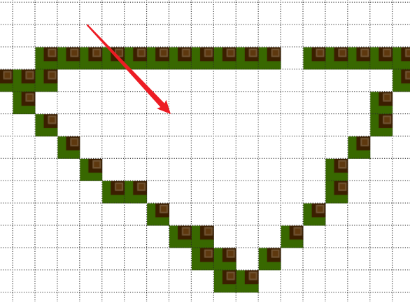
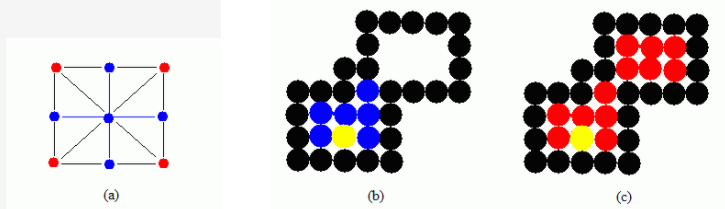
这里使用 4-联通算法
注: 8-联通 和 4-联通只是在判断的数量上有区别,下图蓝色的是 4联通,红色是8联通的效果

```js
// 4联通要判断的方向
const direction_4 = [
{ offsetX: -1, offsetY: 0 },
{ offsetX: 1, offsetY: 0 },
{ offsetX: 0, offsetY: -1 },
{ offsetX: 0, offsetY: 1 },
]
// 8联通要判断的方向
const direction_8 = [
{ offsetX: 0, offsetY: -1 },
{ offsetX: 0, offsetY: 1 },
{ offsetX: -1, offsetY: 0 },
{ offsetX: 1, offsetY: 0 },
{ offsetX: -1, offsetY: 1 },
{ offsetX: -1, offsetY: -1 },
{ offsetX: 1, offsetY: 1 },
{ offsetX: 1, offsetY: -1 },
]
```
### 注入填充算法
Flood Fill Algorithm
这个可以用来实现颜色替换
注入填充算法没有边界的概念,只是对联通区域内 **指定的颜色进行替换**
```js
function floodSeedFill(map, x, y, oldValue, newValue, maxX, minX, maxY, minY) {
// 要做边界值判断
if (
x > maxX ||
x < minX ||
y > maxY ||
y < minY) {
return
}
// 递归条件就是某个方向上指定的位置为旧值
if (map[x][y] == oldValue) {
map[x][y] = newValue
for (let i = 0; i < direction_4.length; i++) {
const newX = x + direction_4[i].offsetX
const newY = y + direction_4[i].offsetY
floodSeedFill(map, newX, newY, oldValue, newValue, maxX, minX, maxY, minY)
}
}
}
```
### 边界填充算法
Boundary Fill Algorithm
这个与上面那个注入填充侧重的方向不同,这个更在于的是边界(指定的颜色为边界),它会替换指定边界内的所有值
```js
function BoundarySeedFill(map, x, y, boundaryValue, newValue, maxX, minX, maxY, minY) {
// 要做边界值判断
if (
x > maxX ||
x < minX ||
y > maxY ||
y < minY) {
return
}
if (map[x][y] !== boundaryValue && map[x][y] !== newValue) {
map[x][y] = newValue
for (let i = 0; i < direction_4.length; i++) {
const newX = x + direction_4[i].offsetX
const newY = y + direction_4[i].offsetY
BoundarySeedFill(map, newX, newY, boundaryValue, newValue, maxX, minX, maxY, minY)
}
}
}
```
## Reference ~
* 参考资料 [CGA填充算法之种子填充算法](https://www.cnblogs.com/icmzn/p/5065306.html)(因为格子数量不多,所以这里就不使用扫描线算法了)
* 参考资料 [MDN Tiles and tilemaps overview](https://developer.mozilla.org/en-US/docs/Games/Techniques/Tilemaps)(一个瓷砖地图包含的基本元素) 