# ActionSheetForAndroid
**Repository Path**: coolblood/ActionSheetForAndroid
## Basic Information
- **Project Name**: ActionSheetForAndroid
- **Description**: IOS UIActionSheet in Android
- **Primary Language**: Java
- **License**: Not specified
- **Default Branch**: master
- **Homepage**: None
- **GVP Project**: No
## Statistics
- **Stars**: 0
- **Forks**: 0
- **Created**: 2020-06-12
- **Last Updated**: 2020-12-19
## Categories & Tags
**Categories**: Uncategorized
**Tags**: None
## README
# ActionSheetForAndroid
模仿IOS里面的UIActionSheet控件,有IOS6和IOS7两种风格,可以自定义风格,背景图片、按钮图片、文字颜色、间距等。
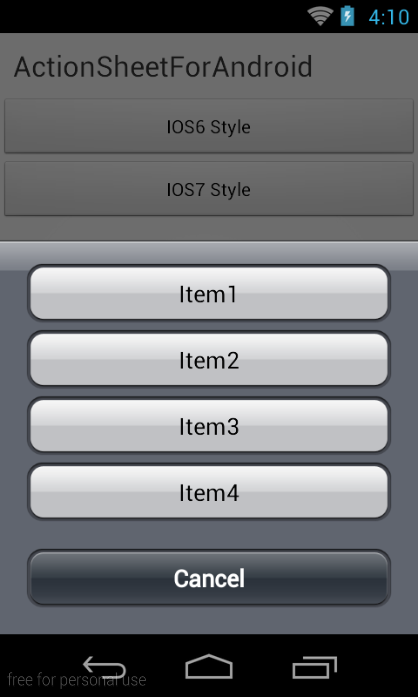
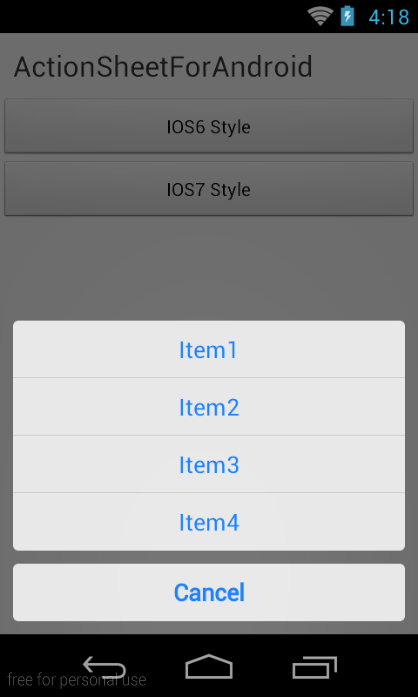
# 使用方法
### 创建一个ActionSheet并显示
```java
ActionSheet.createBuilder(this, getSupportFragmentManager())
.setCancelButtonTitle("Cancel")
.setOtherButtonTitles("Item1", "Item2", "Item3", "Item4")
.setCancelableOnTouchOutside(true)
.setListener(this).show();
```
### 方法说明
* `setCancelButtonTitle()` 设置取消按钮的标题
* `setOtherButtonTitles()` 设置条目,String[]
* `setCancelableOnTouchOutside()` 设置点击空白处关闭
* `setListener()` 设置事件监听器
* `show()` 返回`ActionSheet`对象,可以调用`ActionSheet`对象的`dismiss()`方法手动关闭
### 事件监听
实现`ActionSheetListener`接口
* `onOtherButtonClick()` 点击某个条目,`index`是条目的下标
* `onCancel` 取消事件,点击取消按钮,或者点击空白处(`setCancelableOnTouchOutside(true)`)
* `onDismiss()` 关闭事件
```java
@Override
public void onOtherButtonClick(ActionSheet actionSheet, int index) {
Toast.makeText(getApplicationContext(), "click item index = " + index,
0).show();
}
@Override
public void onCancel(ActionSheet actionSheet) {
Toast.makeText(getApplicationContext(), "cancel", 0).show();
}
@Override
public void onDismiss(ActionSheet actionSheet) {
Toast.makeText(getApplicationContext(), "dismissed", 0).show();
}
```
### 样式
默认的样式非常丑陋,项目中提供了两种Style,可以配置Theme
```xml
```
还可以自定义样式,自定义一个style即可,可以参考ActionSheetStyleIOS6/ActionSheetStyleIOS7的写法
```xml
```
### Style属性介绍
* `actionSheetBackground` 背景
* `cancelButtonBackground` 取消按钮背景
* `otherButtonTopBackground` 选项顶部按钮背景
* `otherButtonMiddleBackground` 选项中部按钮背景
* `otherButtonBottomBackground` 选项底部按钮背景
* `otherButtonSingleBackground` 选项只有一个的按钮背景
* `cancelButtonTextColor` 取消按钮的文字颜色
* `otherButtonTextColor` 选项按钮的文字颜色
* `actionSheetPadding` 内边距
* `otherButtonSpacing` 选项按钮的间距
* `cancelButtonMarginTop` 取消按钮顶部间距
* `actionSheetTextSize` 选项按钮文字颜色