# js-conditional-compile-loader
**Repository Path**: hzsrc/js-conditional-compile-loader
## Basic Information
- **Project Name**: js-conditional-compile-loader
- **Description**: A javascript conditional compile loader for webpack. 一个javascript条件编译的webpack loader。
- **Primary Language**: JavaScript
- **License**: MIT
- **Default Branch**: master
- **Homepage**: None
- **GVP Project**: No
## Statistics
- **Stars**: 0
- **Forks**: 0
- **Created**: 2021-04-18
- **Last Updated**: 2021-04-18
## Categories & Tags
**Categories**: Uncategorized
**Tags**: None
## README
# js-conditional-compile-loader
- [中文文档](https://github.com/hzsrc/js-conditional-compile-loader/blob/master/readme-cn.md)
- [Introduction](https://segmentfault.com/a/1190000020102151)
A conditional compiling loader for webpack, support any source files like js, ts, vue, css, scss, html.
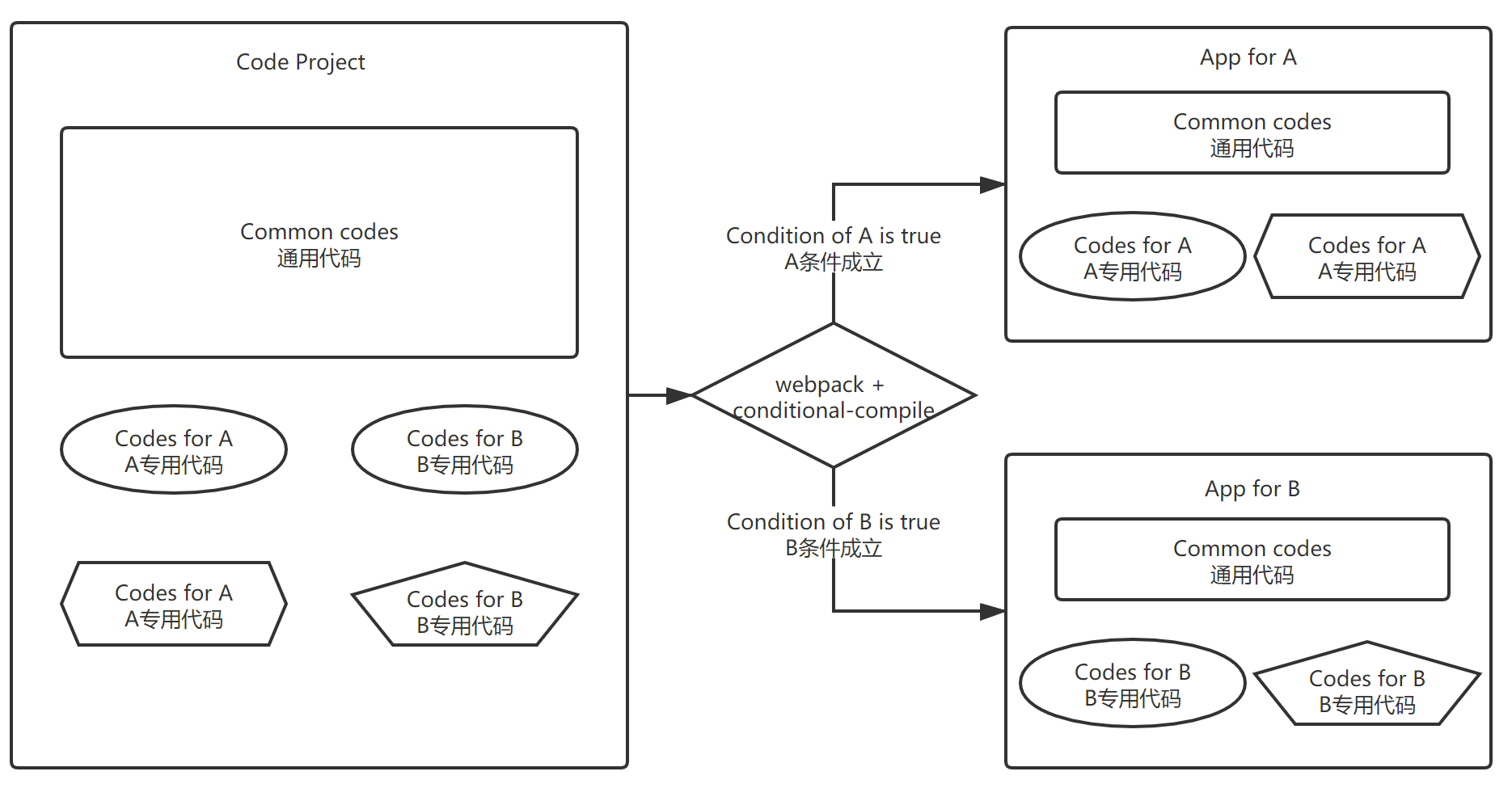
**Conditional compiling** means that we can use the same codes and compiling process, to build different applications with different environment conditions.
- For example: we can output two different program for debug or release environment with a same source code project.
- Another sample: Use same codes and compiling process to supply different customers, just by using different building command args, like this: `npm run build --ali` for alibaba, `npm run build --tencent` for tencent。
### Usage
This loader provides two directives: `IFDEBUG` and `IFTRUE`. Just use them anywhere in js code like this: Start with `/*IFDEBUG` or `/*IFTRUE_xxx`, end with `FIDEBUG*/` or `FITRUE_xxx*/`, place js code in the center. The `xxx` is any condition property of the options in webpack, such like `myFlag`.
- Mode 1 - comment all
Since it is designed by a js comment style, the code can run normaly even though the js-conditional-compile-loader is not used.
````js
/* IFDEBUG Any js here FIDEBUG */
````
````js
/* IFTRUE_yourFlagName ...js code... FITRUE_yourFlagName */
````
- Mode 2 -- head and foot
In this mode, you can use eslint to check your code.
````js
/* IFDEBUG */
var anyJsHere = 'Any js here'
/*FIDEBUG */
````
````js
/* IFTRUE_yourFlagName*/
function anyJsHere(){
}
/*FITRUE_yourFlagName */
````
----
### Build result with source code
Source code:
````js
/* IFTRUE_forAlibaba */
var aliCode = require('./ali/alibaba-business.js')
aliCode.doSomething()
/* FITRUE_forAlibaba */
$state.go('win', {dir: menu.winId /*IFDEBUG , reload: true FIDEBUG*/})
````
Compiled output by options: `{isDebug: true, forAlibaba: true}`:
````js
var aliCode = require('./ali/alibaba-business.js')
aliCode.doSomething()
$state.go('win', {dir: menu.winId, reload: true })
````
Compiled output by options: `{isDebug: false, forAlibaba: false}`:
````js
$state.go('win', {dir: menu.winId})
````
----
### Setup
````bash
npm i -D js-conditional-compile-loader
````
### Config in webpack
Change webpack config like this:
See this sample: vue-element-ui-scaffold-webpack4(https://github.com/hzsrc/vue-element-ui-scaffold-webpack4)
`js-conditional-compile-loader` needs to be added as step 1 for a rule, means it is set as the last item of the `use` array.
This sample is a config for `vue` and `js` files, `ts` file is alike. For config of css、scss, See [this sample](https://github.com/hzsrc/vue-element-ui-scaffold-webpack4/blob/master/build/utils.js)
````js
const conditionalCompiler = {
loader: 'js-conditional-compile-loader',
options: {
isDebug: process.env.NODE_ENV === 'development', // optional, this expression is default
envTest: process.env.ENV_CONFIG === 'test', // any prop name you want, used for /* IFTRUE_evnTest ...js code... FITRUE_evnTest */
myFlag: process.env.npm_config_myflag, // enabled by `npm run build --myflag`
}
}
module.exports = {
// others...
module: {
rules: [
{
test: /\.vue$/,
use: ['vue-loader', conditionalCompiler],
},
{
test: /\.js$/,
include: [resolve('src'), resolve('test')],
use: [
//step-2
'babel-loader?cacheDirectory',
//step-1
conditionalCompiler,
],
},
// others...
]
}
}
````
### options
- isDebug: boolean
If `isDebug` === false, all the codes between `/\*IFDEBUG` and `FIDEBUG\*/` will be removed, otherwise the codes will be remained.
Defualt value of `isDebug` is set by: process.env.NODE_ENV === 'development'
- \[any propertyName\]:{bool}
if [propertyValue] === false, all codes between `/\* IFTRUE_propertyName` and `FITRUE_propertyName \*/` will be removed, otherwise the codes will be remained.
## Samples -- Any file, Anywhere!
Conditional compiling directives can be used anywhere in any source files.
Like these:
* 1:
````typescript
const tx = "This is app /* IFTRUE_Ali of debug FITRUE_Ali */ here";
/*IFDEBUG
let tsFunc = function(arr: number[]) : string {
alert('Hi~');
return arr.length.toString()
}
FIDEBUG*/
````
* 2:
````scss
/* IFTRUE_myFlag */
div > ul > li {
a {
color: red;
}
}
/*FITRUE_myFlag */
h2{
background: red;
/* IFTRUE_myFlag
color: blue;
FITRUE_myFlag */
}
````
* 3
```js
Vue.component('debugInfo', {
template: ''
/* IFDEBUG
+ '{{JSON.stringify($attrs.info || "", null, 4).replace(/"(\\w+)":/g, "$1:")}}'
FIDEBUG */
,
watch: {
/* IFTRUE_myFlag */
curRule (v){
this.ruleData = v
},
/*FITRUE_myFlag */
},
});
```
* 4
```vue
/* IFTRUE_myFlag
This is a test! For HTML. vue模板内也可以使用!
{{$attrs.info || ''}}
FITRUE_myFlag */