(R.id.idOfYourThemedButtonGroup)
themedButtonGroup.setOnSelectListener { button: ThemedButton ->
// handle selected button
}
```
Once a button is selected its property `isSelected` will be set to true.
Java
```java
// get the selected buttons:
List selectedButtons = themedButtonGroup.getSelectedButtons();
// get all buttons
List allButtons = themedButtonGroup.getButtons();
// get all unselected buttons
List unselectedButtons = allButtons.stream().filter(btn -> !btn.isSelected()).collect(Collectors.toList());
```
```kotlin
// get the selected buttons:
val selectedButtons = themedButtonGroup.selectedButtons
// get all buttons
val allButtons = themedButtonGroup.buttons
// get all unselected buttons
val unselectedButtons = allButtons.filter { !it.isSelected }
```
## Programmatically adding buttons
A demo project for this can be found here: [programmatically-add-buttons](https://github.com/Bryanx/themed-toggle-button-group/tree/master/demo-programmatically-add-buttons). \
Programmatically create a `ThemedToggleButtonGroup`:
Java
```java
ThemedToggleButtonGroup buttonGroup = ThemedToggleButtonGroup(context);
buttonGroup.setJustifyContent(JustifyContent.CENTER);
yourRootView.addView(buttonGroup);
```
```kotlin
val buttonGroup = ThemedToggleButtonGroup(context)
buttonGroup.justifyContent = JustifyContent.CENTER
yourRootView.addView(buttonGroup)
```
Add a button:
Java
```java
ThemedButton btn1 = ThemedButton(context);
btn1.setText("Button 1");
buttonGroup.addView(btn1,
ViewGroup.LayoutParams(
ViewGroup.LayoutParams.WRAP_CONTENT,
ViewGroup.LayoutParams.MATCH_PARENT
)
);
```
```kotlin
val btn1 = ThemedButton(context)
btn1.text = "Button 1"
buttonGroup.addView(btn1,
ViewGroup.LayoutParams(
ViewGroup.LayoutParams.WRAP_CONTENT,
ViewGroup.LayoutParams.MATCH_PARENT
)
)
```
Select/deselect a button programmatically:
You can pass in the `ThemedButton` itself or its resId. This will toggle selection. Fire the method a second time to deselect the button.
```kotlin
buttonGroup.selectButtonWithAnimation(btn)
buttonGroup.selectButton(btn)
```
Enabling/disabling buttons:
Java
```java
btn.setEnabled(false);
// this will fail:
buttonGroup.selectButton(btn);
```
```kotlin
btn.isEnabled = false
// this will fail:
buttonGroup.selectButton(btn)
```
# Customization
These lists include all custom attributes from this library. Please take a look [FlexboxLayout](https://github.com/google/flexbox-layout) to see all custom attributes that can also be applied to these Views.
## ThemedToggleButtonGroup custom attributes
Attribute | Default value | Description
--- | --- | ---
`app:toggle_selectableAmount` | 1 | The amount of buttons that are allowed to be selected. If the user tries to select more buttons, the button that was last selected will be deselected.
`app:toggle_requiredAmount` | 1 | The amount of buttons that are required to be selected. If the user tries to deselect a button below the required amount, the selection is blocked. You can programmatically specify which buttons should be selected initially by setting `ThemedButton.isSelected`. Otherwise a random button will be selected initially.
`app:toggle_horizontalSpacing` | 10dp | The amount of space between the buttons when they are positioned next to each other.
`app:toggle_selectAnimation` | SelectAnimation.CIRCULAR_REVEAL | The type of animations that occur upon selecting a button. Some animations require a certain API level. If the API level is not met SelectAnimation.FADE is used instead.
## ThemedButton custom attributes
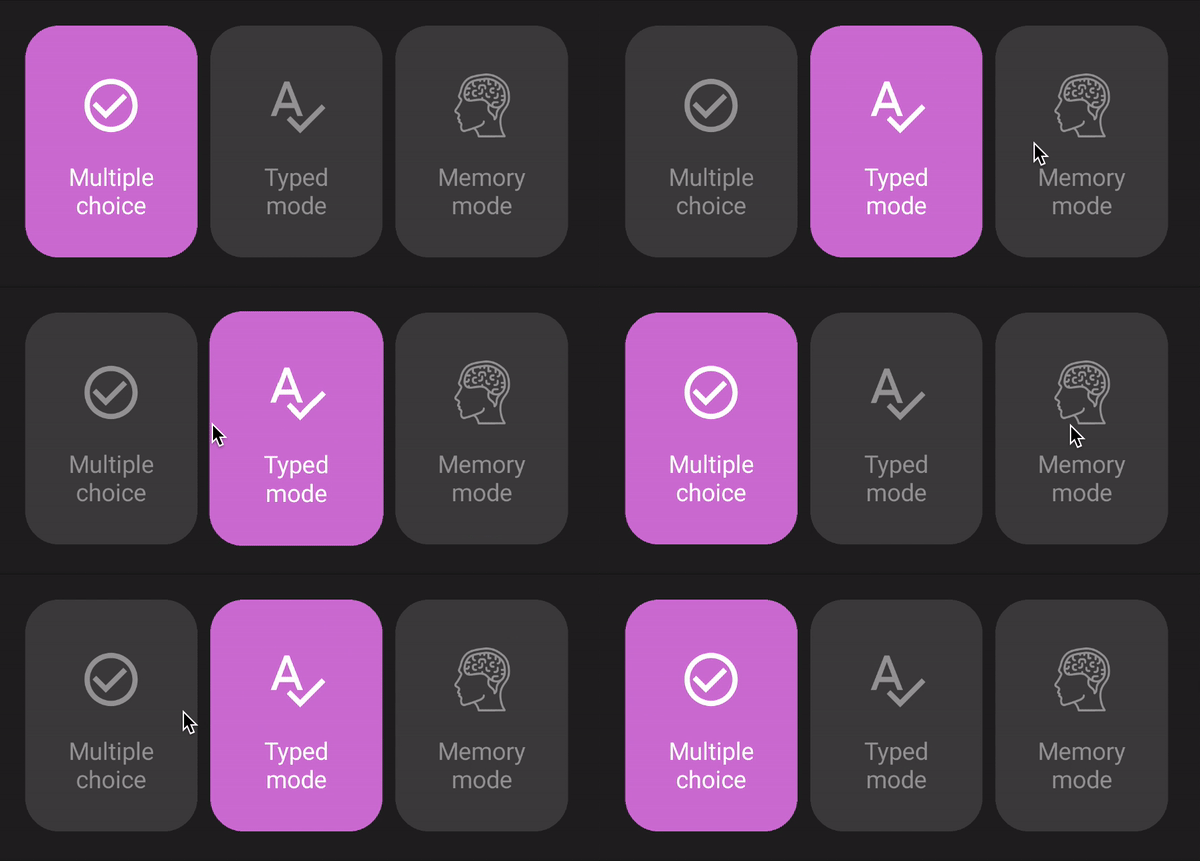 \
You can fully customise colors, positioning, font size, etc. with these attributes.
Attribute | Default value | Description
--- | --- | ---
`app:toggle_text` | Empty string | Text of the button.
`app:toggle_selectedText` | `app:toggle_text` | Text when the button is selected. If not present the text of `toggle_text` is used.
`app:toggle_textSize` | 15sp | Size of the text in the button.
`app:toggle_textAlignment` | center | Alignment of the text. (API 17+)
`app:toggle_fontFamily` | Roboto (Android default) | The font of the text. Put your font file in `/src/main/assets`. And enter the the rest of the path here. For example if your font is in: `/src/main/assets/fonts/arial.ttf` enter this in your layout: `app:toggle_fontFamily="/fonts/arial.ttf"`
`app:toggle_backgroundColor` |  `#EBEBEB` | Background color when the button is not selected.
`app:toggle_selectedBackgroundColor` |  `#5E6FED` | Background color when the button is selected.
`app:toggle_textColor` |  `#5E5E5E` | Text color when the button is not selected. This also sets the color of the icon if it is not set.
`app:toggle_selectedTextColor` |  `#FFFFFF` | Text color when the button is selected. This also sets the color of the selected icon if it is not set.
`app:toggle_icon` | null | Optional icon inside the button.
`app:toggle_selectedIcon` | `app:toggle_icon` | Icon when the button is selected. By default the icon of `app:toggle_icon` is used.
`app:toggle_iconColor` |  `#5E5E5E` | Color of the icon when the button is not selected.
`app:toggle_btnCornerRadius` | 21dp | Curve amount of the button's corners.
`app:toggle_circularCornerRadius` | false | This makes the button circular. This overrides the corner radius.
`app:toggle_borderWidth` | 0dp | The width of the border.
`app:toggle_selectedBorderWidth` | `app:toggle_borderWidth` | The width of the border when the button is selected. By default the width of `toggle_borderWidth` is used.
`app:toggle_borderColor` |  `#5E5E5E` | The color of the border.
`app:toggle_selectedBorderColor` | `app:toggle_borderColor` | The color of the border when the button is selected.. By default the color of `app:toggle_borderColor` is used.
`app:toggle_padding` | 0dp | Padding of the button.
`app:toggle_textPadding` | 14dp (horizontal) | Padding of the text.
`app:toggle_iconPadding` | 0dp | Padding of the icon.
`app:toggle_iconGravity` | top\|start | Position of the icon.
`app:toggle_textGravity` | top\|start | Position of the text.
## Contributing
You can contribute by [opening an issue](https://github.com/Bryanx/themed-toggle-button-group/issues) or forking this repository and creating a pull request.
## License
[License of this library](https://github.com/Bryanx/themed-toggle-button-group/blob/master/LICENSE)\
[License of FlexboxLayout](https://github.com/google/flexbox-layout/blob/master/LICENSE)