 # **Q**uestion and **A**nswer based on **Anything**








 ***NOTE:***
- In `WithoutReranker` setting, our `bce-embedding-base_v1` outperforms all the other embedding models.
- With fixing the embedding model, our `bce-reranker-base_v1` achieves the best performance.
- **The combination of `bce-embedding-base_v1` and `bce-reranker-base_v1` is SOTA**.
- If you want to use embedding and rerank separately, please refer to [BCEmbedding](https://github.com/netease-youdao/BCEmbedding)
#### LLM
The open source version of QAnything is based on QwenLM and has been fine-tuned on a large number of professional question-answering datasets. It greatly enhances the ability of question-answering.
If you need to use it for commercial purposes, please follow the license of QwenLM. For more details, please refer to: [QwenLM](https://github.com/QwenLM/Qwen)
## Before You Start
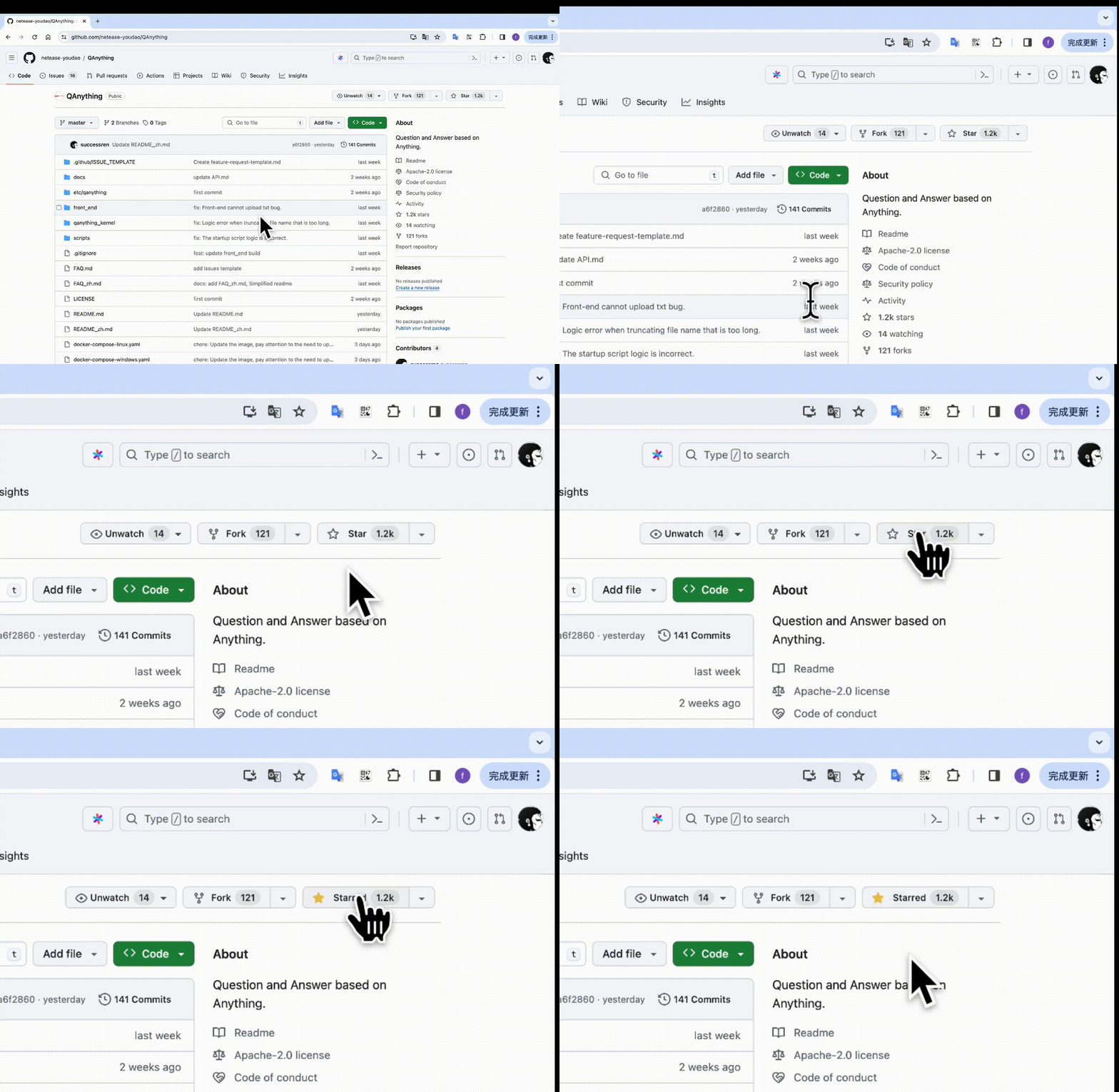
**Star us on GitHub, and be instantly notified for new release!**
* [🏄 Try QAnything Online](https://qanything.ai)
* [📚 Try read.youdao.com | 有道速读](https://read.youdao.com)
* [🛠️ Only use our BCEmbedding(embedding & rerank)](https://github.com/netease-youdao/BCEmbedding)
* [📖 FAQ](FAQ_zh.md)
## Getting Started
### Prerequisites
#### **For Linux**
|**System**| **Required item** | **Minimum Requirement** | **Note** |
|---------------------------|--------------------|-------------------------|------------------------------------------------------------------|
|Linux | NVIDIA GPU Memory | >= 4GB (use OpenAI API) | Minimum: GTX 1050Ti(use OpenAI API)
Welcome to the QAnything [Discord](https://discord.gg/5uNpPsEJz8) community
### WeChat Group
Welcome to scan the QR code below and join the WeChat group.
***NOTE:***
- In `WithoutReranker` setting, our `bce-embedding-base_v1` outperforms all the other embedding models.
- With fixing the embedding model, our `bce-reranker-base_v1` achieves the best performance.
- **The combination of `bce-embedding-base_v1` and `bce-reranker-base_v1` is SOTA**.
- If you want to use embedding and rerank separately, please refer to [BCEmbedding](https://github.com/netease-youdao/BCEmbedding)
#### LLM
The open source version of QAnything is based on QwenLM and has been fine-tuned on a large number of professional question-answering datasets. It greatly enhances the ability of question-answering.
If you need to use it for commercial purposes, please follow the license of QwenLM. For more details, please refer to: [QwenLM](https://github.com/QwenLM/Qwen)
## Before You Start
**Star us on GitHub, and be instantly notified for new release!**

* [🏄 Try QAnything Online](https://qanything.ai)
* [📚 Try read.youdao.com | 有道速读](https://read.youdao.com)
* [🛠️ Only use our BCEmbedding(embedding & rerank)](https://github.com/netease-youdao/BCEmbedding)
* [📖 FAQ](FAQ_zh.md)
## Getting Started
### Prerequisites
#### **For Linux**
|**System**| **Required item** | **Minimum Requirement** | **Note** |
|---------------------------|--------------------|-------------------------|------------------------------------------------------------------|
|Linux | NVIDIA GPU Memory | >= 4GB (use OpenAI API) | Minimum: GTX 1050Ti(use OpenAI API)
Welcome to the QAnything [Discord](https://discord.gg/5uNpPsEJz8) community
### WeChat Group
Welcome to scan the QR code below and join the WeChat group.
 ### Email
If you need to contact our team privately, please reach out to us via the following email:
qanything@rd.netease.com
### GitHub issues
Reach out to the maintainer at one of the following places:
- [Github issues](https://github.com/netease-youdao/QAnything/issues)
- Contact options listed on [this GitHub profile](https://github.com/netease-youdao)
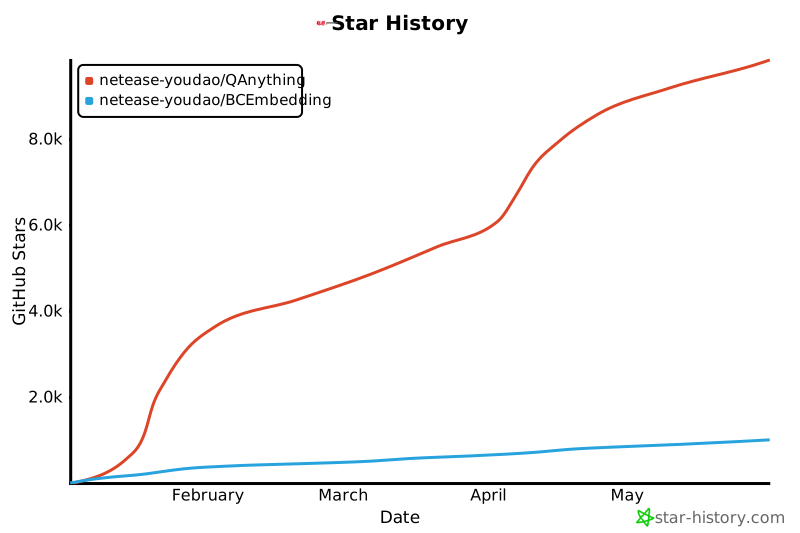
## Star History
[](https://star-history.com/#netease-youdao/QAnything&netease-youdao/BCEmbedding&Date)
## License
`QAnything` is licensed under [Apache 2.0 License](./LICENSE)
## Acknowledgments
`QAnything` adopts dependencies from the following:
- Thanks to our [BCEmbedding](https://github.com/netease-youdao/BCEmbedding) for the excellent embedding and rerank model.
- Thanks to [Qwen](https://github.com/QwenLM/Qwen) for strong base language models.
- Thanks to [Triton Inference Server](https://github.com/triton-inference-server/server) for providing great open source inference serving.
- Thanks to [FastChat](https://github.com/lm-sys/FastChat) for providing a fully OpenAI-compatible API server.
- Thanks to [FasterTransformer](https://github.com/NVIDIA/FasterTransformer) and [vllm](https://github.com/vllm-project/vllm) for highly optimized LLM inference backend.
- Thanks to [Langchain](https://github.com/langchain-ai/langchain) for the wonderful llm application framework.
- Thanks to [Langchain-Chatchat](https://github.com/chatchat-space/Langchain-Chatchat) for the inspiration provided on local knowledge base Q&A.
- Thanks to [Milvus](https://github.com/milvus-io/milvus) for the excellent semantic search library.
- Thanks to [PaddleOCR](https://github.com/PaddlePaddle/PaddleOCR) for its ease-to-use OCR library.
- Thanks to [Sanic](https://github.com/sanic-org/sanic) for the powerful web service framework.
### Email
If you need to contact our team privately, please reach out to us via the following email:
qanything@rd.netease.com
### GitHub issues
Reach out to the maintainer at one of the following places:
- [Github issues](https://github.com/netease-youdao/QAnything/issues)
- Contact options listed on [this GitHub profile](https://github.com/netease-youdao)
## Star History
[](https://star-history.com/#netease-youdao/QAnything&netease-youdao/BCEmbedding&Date)
## License
`QAnything` is licensed under [Apache 2.0 License](./LICENSE)
## Acknowledgments
`QAnything` adopts dependencies from the following:
- Thanks to our [BCEmbedding](https://github.com/netease-youdao/BCEmbedding) for the excellent embedding and rerank model.
- Thanks to [Qwen](https://github.com/QwenLM/Qwen) for strong base language models.
- Thanks to [Triton Inference Server](https://github.com/triton-inference-server/server) for providing great open source inference serving.
- Thanks to [FastChat](https://github.com/lm-sys/FastChat) for providing a fully OpenAI-compatible API server.
- Thanks to [FasterTransformer](https://github.com/NVIDIA/FasterTransformer) and [vllm](https://github.com/vllm-project/vllm) for highly optimized LLM inference backend.
- Thanks to [Langchain](https://github.com/langchain-ai/langchain) for the wonderful llm application framework.
- Thanks to [Langchain-Chatchat](https://github.com/chatchat-space/Langchain-Chatchat) for the inspiration provided on local knowledge base Q&A.
- Thanks to [Milvus](https://github.com/milvus-io/milvus) for the excellent semantic search library.
- Thanks to [PaddleOCR](https://github.com/PaddlePaddle/PaddleOCR) for its ease-to-use OCR library.
- Thanks to [Sanic](https://github.com/sanic-org/sanic) for the powerful web service framework.