# mlx-omni-server
**Repository Path**: mirrors_GEBIT/mlx-omni-server
## Basic Information
- **Project Name**: mlx-omni-server
- **Description**: MLX Omni Server is a local inference server powered by Apple's MLX framework, specifically designed for Apple Silicon (M-series) chips. It implements OpenAI-compatible API endpoints, enabling seamless integration with existing OpenAI SDK clients while leveraging the power of local ML inference.
- **Primary Language**: Unknown
- **License**: MIT
- **Default Branch**: main
- **Homepage**: None
- **GVP Project**: No
## Statistics
- **Stars**: 0
- **Forks**: 1
- **Created**: 2025-10-12
- **Last Updated**: 2026-03-15
## Categories & Tags
**Categories**: Uncategorized
**Tags**: None
## README
# MLX Omni Server
*Local AI inference server optimized for Apple Silicon*
[](https://pypi.python.org/pypi/mlx-omni-server)
[](https://python.org)
[](https://opensource.org/licenses/MIT)
[](https://deepwiki.com/madroidmaq/mlx-omni-server)

**MLX Omni Server** provides dual API compatibility with both **OpenAI** and **Anthropic APIs**, enabling seamless local inference on Apple Silicon using the MLX framework.
[Installation](#-installation) • [Quick Start](#-quick-start) • [Documentation](#-documentation) • [Contributing](#-contributing)
## ✨ Features
- 🚀 **Apple Silicon Optimized** - Built on MLX framework for M1/M2/M3/M4 chips
- 🔌 **Dual API Support** - Compatible with both OpenAI and Anthropic APIs
- 🎯 **Complete AI Suite** - Chat, audio processing, image generation, embeddings
- ⚡ **High Performance** - Local inference with hardware acceleration
- 🔐 **Privacy-First** - All processing happens locally on your machine
- 🛠 **Drop-in Replacement** - Works with existing OpenAI and Anthropic SDKs
## 🚀 Installation
```bash
pip install mlx-omni-server
```
## ⚡ Quick Start
1. **Start the server:**
```bash
mlx-omni-server
```
2. **Choose your preferred API:**
OpenAI API (Click to expand)
```python
from openai import OpenAI
client = OpenAI(
base_url="http://localhost:10240/v1",
api_key="not-needed"
)
response = client.chat.completions.create(
model="mlx-community/gemma-3-1b-it-4bit-DWQ",
messages=[{"role": "user", "content": "Hello!"}]
)
print(response.choices[0].message.content)
```
Anthropic API (Click to expand)
```python
import anthropic
client = anthropic.Anthropic(
base_url="http://localhost:10240/anthropic",
api_key="not-needed"
)
message = client.messages.create(
model="mlx-community/gemma-3-1b-it-4bit-DWQ",
max_tokens=1000,
messages=[{"role": "user", "content": "Hello!"}]
)
print(message.content[0].text)
```
🎉 **That's it!** You're now running AI locally on your Mac.
## 📋 API Support
### OpenAI Compatible Endpoints (`/v1/*`)
| Endpoint | Feature | Status |
|----------|---------|--------|
| `/v1/chat/completions` | Chat with tools, streaming, structured output | ✅ |
| `/v1/audio/speech` | Text-to-Speech | ✅ |
| `/v1/audio/transcriptions` | Speech-to-Text | ✅ |
| `/v1/images/generations` | Image Generation | ✅ |
| `/v1/embeddings` | Text Embeddings | ✅ |
| `/v1/models` | Model Management | ✅ |
### Anthropic Compatible Endpoints (`/anthropic/v1/*`)
| Endpoint | Feature | Status |
|----------|---------|--------|
| `/anthropic/v1/messages` | Messages with tools, streaming, thinking mode | ✅ |
| `/anthropic/v1/models` | Model listing with pagination | ✅ |
## ⚙️ Configuration
```bash
# Default (port 10240)
mlx-omni-server
# Custom options
mlx-omni-server --port 8000
MLX_OMNI_LOG_LEVEL=debug mlx-omni-server
# View all options
mlx-omni-server --help
```
## 🛠 Development
Development Setup
```bash
git clone https://github.com/madroidmaq/mlx-omni-server.git
cd mlx-omni-server
uv sync
# Start with hot-reload
uv run uvicorn mlx_omni_server.main:app --reload --host 0.0.0.0 --port 10240
```
**Testing:**
```bash
uv run pytest # All tests
uv run pytest tests/chat/openai/ # OpenAI tests
uv run pytest tests/chat/anthropic/ # Anthropic tests
```
**Code Quality:**
```bash
uv run black . && uv run isort . # Format code
uv run pre-commit run --all-files # Run hooks
```
## 🎯 Key Features
**Model Management**
- Auto-discovery of MLX models in HuggingFace cache
- On-demand loading and intelligent caching
- Automatic model downloading when needed
**Advanced Capabilities**
- Function calling with model-specific parsers
- Real-time streaming for both APIs
- JSON schema validation and structured output
- Extended reasoning (thinking mode) for supported models
## 📚 Documentation
| Resource | Description |
|----------|-------------|
| [OpenAI API Guide](docs/openai-api.md) | Complete OpenAI API reference |
| [Anthropic API Guide](docs/anthropic-api.md) | Complete Anthropic API reference |
| [Examples](examples/) | Practical usage examples |
## 🔍 Troubleshooting
Common Issues
**Requirements:**
- Python 3.11+
- Apple Silicon Mac (M1/M2/M3/M4)
- MLX framework installed
**Quick fixes:**
```bash
# Check requirements
python --version # Should be 3.11+
python -c "import mlx; print(mlx.__version__)"
# Pre-download models (if needed)
huggingface-cli download mlx-community/gemma-3-1b-it-4bit-DWQ
# Enable debug logging
MLX_OMNI_LOG_LEVEL=debug mlx-omni-server
```
## 🤝 Contributing
**Quick contributor setup:**
```bash
git clone https://github.com/madroidmaq/mlx-omni-server.git
cd mlx-omni-server
uv sync && uv run pytest
```
---
## 🙏 Acknowledgments
Built with [MLX](https://github.com/ml-explore/mlx) by Apple • [FastAPI](https://fastapi.tiangolo.com/) • [MLX-LM](https://github.com/ml-explore/mlx-lm)
## 📄 License
[MIT License](LICENSE) • Not affiliated with OpenAI, Anthropic, or Apple
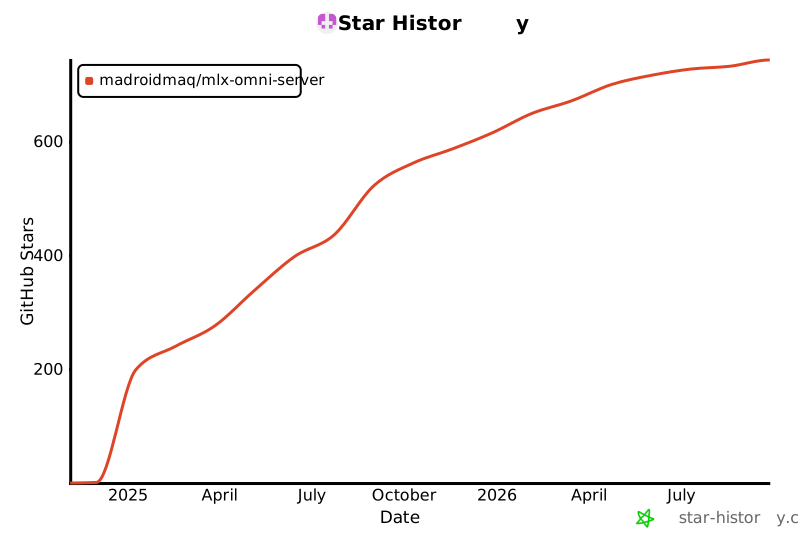
## 🌟 Star History
[](https://star-history.com/#madroidmaq/mlx-omni-server&Date)