# git-notify
**Repository Path**: mirrors_trending/git-notify
## Basic Information
- **Project Name**: git-notify
- **Description**: 🙉 📣 Communicate important updates to your team via git commit messages
- **Primary Language**: Unknown
- **License**: MIT
- **Default Branch**: master
- **Homepage**: None
- **GVP Project**: No
## Statistics
- **Stars**: 0
- **Forks**: 1
- **Created**: 2021-03-03
- **Last Updated**: 2026-04-04
## Categories & Tags
**Categories**: Uncategorized
**Tags**: None
## README
# git-notify
_Communicate important updates to your team via git commit messages_.
## What is git-notify?
Sometimes you need to communicate changes to other developers on your project. In a small team, a Slack message works okay, but in larger teams and distributed organizations (such as open source projects), reaching everyone can be a pain.
`git-notify` allows you to embed announcements into your git commit messages:
```sh
git commit -m 'git-notify: NEW DEVELOPMENT ENVIRONMENT ...'
```
And display them to another developer on a machine, far far away:
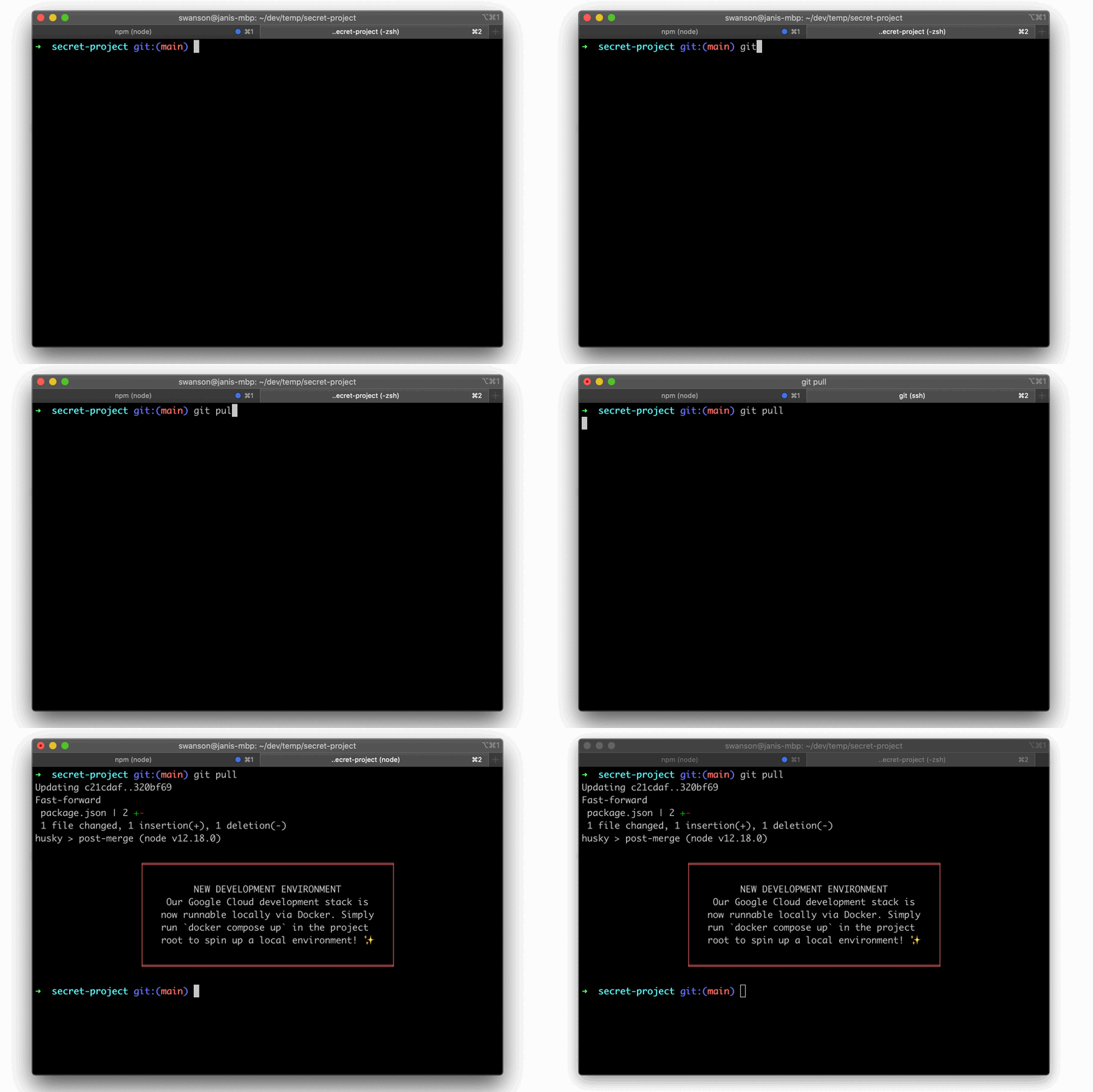 Simple as that.
## How to use git-notify?
Just add `"git-notify:"` to your git commit message, and anything that follows will be displayed when another developer pulls that commit, or switches from a branch that does not contain that commit to one that does.
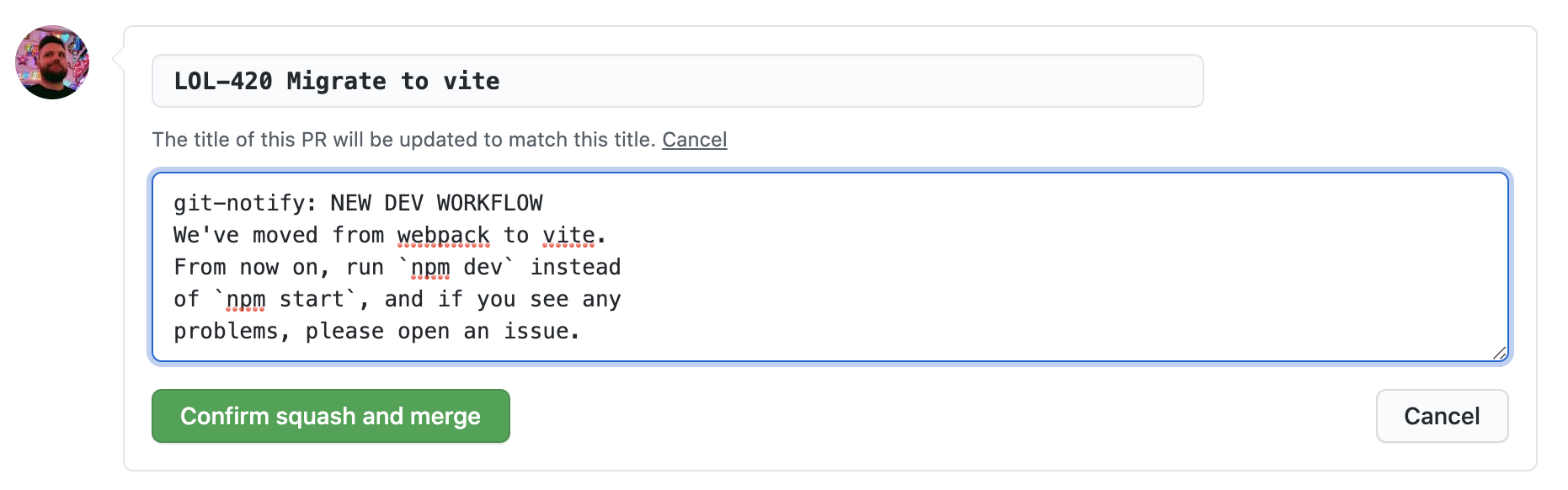
If you're using a merge or squash commit strategy on GitHub, you can also add them to the extended commit message when landing a PR:
Simple as that.
## How to use git-notify?
Just add `"git-notify:"` to your git commit message, and anything that follows will be displayed when another developer pulls that commit, or switches from a branch that does not contain that commit to one that does.
If you're using a merge or squash commit strategy on GitHub, you can also add them to the extended commit message when landing a PR:
 ## Getting Started
Install `git-notify` to your `npm` (or `yarn`) based project as a devDependency:
```bash
# using npm
npm install --save-dev git-notify
# using yarn
yarn add -D git-notify
```
Next, we'll configure `git-notify` to run automatically when other developers pull commits that contain git messages. Below we show how to achieve this with the excellent [husky](https://github.com/typicode/husky) library. For other approaches, see the [Git Hooks](#git-hooks) section later in this document.
### Installing hooks with husky
```
# using npm
npm install --save-dev husky@4
# using yarn
yarn add -D husky@4
```
Configure `git-notify` hooks by adding the following `husky` entries to your `package.json`:
```json
{
//...snip
"husky": {
"hooks": {
"post-merge": "git-notify merge $HUSKY_GIT_PARAMS",
"post-rewrite": "git-notify rewrite $HUSKY_GIT_PARAMS",
"post-checkout": "git-notify checkout $HUSKY_GIT_PARAMS"
}
}
}
```
_**Note:** The above instructions below are for [husky v4.x](https://github.com/typicode/husky/tree/master). Husky v5 has changed how hooks are configured, as well updated its licensing terms to be free only to other open source projects.See [husky's own documentation](https://dev.to/typicode/what-s-new-in-husky-5-32g5) for how to configure hooks in their latest version._
## Configuration
- `git-notify --prefix "@everyone"`
- Change the prefix `git-notify` looks for in git commit messages
- Default: `git-notify:`
- `git-notify --color "#ff6f6f"`
- Change the color of the banner or message
- This can be one of the [`chalk` preset colors](https://www.npmjs.com/package/chalk#colors) or a hex value. Note that not all terminals support full hex color scales.
- `git-notify --simple`
- Instead of a fancy banner, displays a simple text message
### All parameters
Run `npx git-notify --help` for an up to date list of parameters:
```sh
npx git-notify --help
Usage
$ git-notify [options] $GIT_PARAMS
Methods
since show all notifications since commit
merge run on git pull/merge
rewrite run on git rebase
checkout run on git checkout/switch
Options
--prefix, -p prefix to look for in commit messages (default: "git-notify:")
--simple, -s show a plain, unboxed notification
--color, -c color of displayed notification
Examples
$ git-notify since HEAD~5
$ git-notify checkout $GIT_PARAMS
```
## About formatting
`git-notify` will display a message for every "git-notify:" prefix it finds in the commit log that was just pulled/merged/rebased/checked out. **The notification message will be the rest of the paragraph following the prefix.**
For example, this commit message:
```
This change upgrades some of our dependencies. git-notify: Please run npm install
```
Will print:
```
╒════════════════════════════╕
│ │
│ Please run npm install │
│ │
╘════════════════════════════╛
```
The message will run until the end of the paragraph, delimited by a double line break. Single line breaks and other whitespace will be preserved. So that:
```
Rewrite everything.
git-notify:EVERYTHING HAS CHANGED
This project has been rewritten
from scratch. If something broke,
please contact Jeff at dev@null.com.
May god please forgive me.
```
Will display:
```
╒══════════════════════════════════════════╕
│ │
│ EVERYTHING HAS CHANGED │
│ This project has been rewritten │
│ from scratch. If something broke, │
│ please contact Jeff at dev@null.com. │
│ │
╘══════════════════════════════════════════╛
```
You can run `git-notify since` to test configuration and dry-run the message you've just created locally. For example:
```
git commit -m '@team what's up??'
npx git-notify since HEAD~1 --prefix "@team"
```
### Can I group messages
Not at the moment, but this should not be difficult to add. See [Contributing](#contributing)
## Git Hooks
### Installing with husky
See [Installing hooks with husky](#installing-hooks-with-husky) in the Getting Started section.
### Installing hooks by any other means
`git-notify` is agnostic to however you want to install your git hooks.
The hooks you need to configure are:
- **post-merge** (runs on `git pull` and `git merge`)
- `npx git-notify merge $GIT_PARAMS`
- **post-rewrite** (runs on `git rebase`)
- `npx git-notify rewrite $GIT_PARAMS`
- **post-checkout** (runs on `git checkout` -- optional, but useful)
- `npx git-notify checkout $GIT_PARAMS`
At the time of writing, `git-notify checkout` is the only hook that uses the arguments (`$GIT_PARAMS`) passed to the git hook, but ideally you should always pass the arguments to `git-notify`, in case we'll need to use them in a later version.
See [githooks.com](https://githooks.com/) for more resources on the topic. Documentation for different approaches are welcome!
### Installing git-notify without npm
At this time, `git-notify` is a node-based project. While I recognize it could be useful in other types of projects (ruby, python, rust, etc...), cross-platform scripting sucks, and this project is not interested in solving those problems at this time.
However, the `git-notify` beviour has been implemented in other languages:
- **PHP**: [Captain Hook](https://github.com/captainhookphp/captainhook)
If you like this idea, feel free to steal it and implement your own version, and I'll add it here.
## Contributing
This project is open to contributions. For anything that would radically change the nature of the project or increase its maintenance burden, please open an issue first to discuss.
### Local development
This project is written in TypeScript and scaffolded using [tsdx](https://github.com/formium/tsdx).
To run TSDX, use:
```bash
yarn start
```
This builds to `/dist` and runs the project in watch mode so any edits you save inside `src` causes a rebuild to `/dist`.
To do a one-off build, use `npm run build` or `yarn build`.
To run tests, use `npm test` or `yarn test`.
## Thanks
Special thanks to [Sindre Sorhus](https://github.com/sindresorhus), whose excellent [meow](https://github.com/sindresorhus/meow), [boxen](https://github.com/sindresorhus/boxen) and [chalk](https://github.com/chalk/chalk) libraries make developing Node CLIs a breeze.
## LICENSE
[MIT](LICENSE)
## Getting Started
Install `git-notify` to your `npm` (or `yarn`) based project as a devDependency:
```bash
# using npm
npm install --save-dev git-notify
# using yarn
yarn add -D git-notify
```
Next, we'll configure `git-notify` to run automatically when other developers pull commits that contain git messages. Below we show how to achieve this with the excellent [husky](https://github.com/typicode/husky) library. For other approaches, see the [Git Hooks](#git-hooks) section later in this document.
### Installing hooks with husky
```
# using npm
npm install --save-dev husky@4
# using yarn
yarn add -D husky@4
```
Configure `git-notify` hooks by adding the following `husky` entries to your `package.json`:
```json
{
//...snip
"husky": {
"hooks": {
"post-merge": "git-notify merge $HUSKY_GIT_PARAMS",
"post-rewrite": "git-notify rewrite $HUSKY_GIT_PARAMS",
"post-checkout": "git-notify checkout $HUSKY_GIT_PARAMS"
}
}
}
```
_**Note:** The above instructions below are for [husky v4.x](https://github.com/typicode/husky/tree/master). Husky v5 has changed how hooks are configured, as well updated its licensing terms to be free only to other open source projects.See [husky's own documentation](https://dev.to/typicode/what-s-new-in-husky-5-32g5) for how to configure hooks in their latest version._
## Configuration
- `git-notify --prefix "@everyone"`
- Change the prefix `git-notify` looks for in git commit messages
- Default: `git-notify:`
- `git-notify --color "#ff6f6f"`
- Change the color of the banner or message
- This can be one of the [`chalk` preset colors](https://www.npmjs.com/package/chalk#colors) or a hex value. Note that not all terminals support full hex color scales.
- `git-notify --simple`
- Instead of a fancy banner, displays a simple text message
### All parameters
Run `npx git-notify --help` for an up to date list of parameters:
```sh
npx git-notify --help
Usage
$ git-notify [options] $GIT_PARAMS
Methods
since show all notifications since commit
merge run on git pull/merge
rewrite run on git rebase
checkout run on git checkout/switch
Options
--prefix, -p prefix to look for in commit messages (default: "git-notify:")
--simple, -s show a plain, unboxed notification
--color, -c color of displayed notification
Examples
$ git-notify since HEAD~5
$ git-notify checkout $GIT_PARAMS
```
## About formatting
`git-notify` will display a message for every "git-notify:" prefix it finds in the commit log that was just pulled/merged/rebased/checked out. **The notification message will be the rest of the paragraph following the prefix.**
For example, this commit message:
```
This change upgrades some of our dependencies. git-notify: Please run npm install
```
Will print:
```
╒════════════════════════════╕
│ │
│ Please run npm install │
│ │
╘════════════════════════════╛
```
The message will run until the end of the paragraph, delimited by a double line break. Single line breaks and other whitespace will be preserved. So that:
```
Rewrite everything.
git-notify:EVERYTHING HAS CHANGED
This project has been rewritten
from scratch. If something broke,
please contact Jeff at dev@null.com.
May god please forgive me.
```
Will display:
```
╒══════════════════════════════════════════╕
│ │
│ EVERYTHING HAS CHANGED │
│ This project has been rewritten │
│ from scratch. If something broke, │
│ please contact Jeff at dev@null.com. │
│ │
╘══════════════════════════════════════════╛
```
You can run `git-notify since` to test configuration and dry-run the message you've just created locally. For example:
```
git commit -m '@team what's up??'
npx git-notify since HEAD~1 --prefix "@team"
```
### Can I group messages
Not at the moment, but this should not be difficult to add. See [Contributing](#contributing)
## Git Hooks
### Installing with husky
See [Installing hooks with husky](#installing-hooks-with-husky) in the Getting Started section.
### Installing hooks by any other means
`git-notify` is agnostic to however you want to install your git hooks.
The hooks you need to configure are:
- **post-merge** (runs on `git pull` and `git merge`)
- `npx git-notify merge $GIT_PARAMS`
- **post-rewrite** (runs on `git rebase`)
- `npx git-notify rewrite $GIT_PARAMS`
- **post-checkout** (runs on `git checkout` -- optional, but useful)
- `npx git-notify checkout $GIT_PARAMS`
At the time of writing, `git-notify checkout` is the only hook that uses the arguments (`$GIT_PARAMS`) passed to the git hook, but ideally you should always pass the arguments to `git-notify`, in case we'll need to use them in a later version.
See [githooks.com](https://githooks.com/) for more resources on the topic. Documentation for different approaches are welcome!
### Installing git-notify without npm
At this time, `git-notify` is a node-based project. While I recognize it could be useful in other types of projects (ruby, python, rust, etc...), cross-platform scripting sucks, and this project is not interested in solving those problems at this time.
However, the `git-notify` beviour has been implemented in other languages:
- **PHP**: [Captain Hook](https://github.com/captainhookphp/captainhook)
If you like this idea, feel free to steal it and implement your own version, and I'll add it here.
## Contributing
This project is open to contributions. For anything that would radically change the nature of the project or increase its maintenance burden, please open an issue first to discuss.
### Local development
This project is written in TypeScript and scaffolded using [tsdx](https://github.com/formium/tsdx).
To run TSDX, use:
```bash
yarn start
```
This builds to `/dist` and runs the project in watch mode so any edits you save inside `src` causes a rebuild to `/dist`.
To do a one-off build, use `npm run build` or `yarn build`.
To run tests, use `npm test` or `yarn test`.
## Thanks
Special thanks to [Sindre Sorhus](https://github.com/sindresorhus), whose excellent [meow](https://github.com/sindresorhus/meow), [boxen](https://github.com/sindresorhus/boxen) and [chalk](https://github.com/chalk/chalk) libraries make developing Node CLIs a breeze.
## LICENSE
[MIT](LICENSE)