# AstrBot
**Repository Path**: openclaw_chat_md/AstrBot
## Basic Information
- **Project Name**: AstrBot
- **Description**: No description available
- **Primary Language**: Unknown
- **License**: AGPL-3.0
- **Default Branch**: master
- **Homepage**: None
- **GVP Project**: No
## Statistics
- **Stars**: 0
- **Forks**: 0
- **Created**: 2026-03-16
- **Last Updated**: 2026-03-16
## Categories & Tags
**Categories**: Uncategorized
**Tags**: None
## README

AstrBot 是一个开源的一站式 Agentic 个人和群聊助手,可在 QQ、Telegram、企业微信、飞书、钉钉、Slack、等数十款主流即时通讯软件上部署,此外还内置类似 OpenWebUI 的轻量化 ChatUI,为个人、开发者和团队打造可靠、可扩展的对话式智能基础设施。无论是个人 AI 伙伴、智能客服、自动化助手,还是企业知识库,AstrBot 都能在你的即时通讯软件平台的工作流中快速构建 AI 应用。

## 主要功能
1. 💯 免费 & 开源。
2. ✨ AI 大模型对话,多模态,Agent,MCP,Skills,知识库,人格设定,自动压缩对话。
3. 🤖 支持接入 Dify、阿里云百炼、Coze 等智能体平台。
4. 🌐 多平台,支持 QQ、企业微信、飞书、钉钉、微信公众号、Telegram、Slack 以及[更多](#支持的消息平台)。
5. 📦 插件扩展,已有 1000+ 个插件可一键安装。
6. 🛡️ [Agent Sandbox](https://docs.astrbot.app/use/astrbot-agent-sandbox.html) 隔离化环境,安全地执行任何代码、调用 Shell、会话级资源复用。
7. 💻 WebUI 支持。
8. 🌈 Web ChatUI 支持,ChatUI 内置代理沙盒、网页搜索等。
9. 🌐 国际化(i18n)支持。
| 💙 角色扮演 & 情感陪伴 |
✨ 主动式 Agent |
🚀 通用 Agentic 能力 |
🧩 1000+ 社区插件 |

|

|

|

|
## 快速开始
### 一键部署
对于想快速体验 AstrBot、且熟悉命令行并能够自行安装 `uv` 环境的用户,我们推荐使用 `uv` 一键部署方式 ⚡️。
```bash
uv tool install astrbot
astrbot init # 仅首次执行此命令以初始化环境
astrbot run
```
> 需要安装 [uv](https://docs.astral.sh/uv/)。
> [!NOTE]
> 对于 macOS 用户:由于 macOS 安全检查,首次运行 `astrbot` 命令可能需要较长时间(约 10-20 秒)。
更新 `astrbot`:
```bash
uv tool upgrade astrbot
```
### Docker 部署
对于熟悉容器、希望获得更稳定且更适合生产环境部署方式的用户,我们推荐使用 Docker / Docker Compose 部署 AstrBot。
请参考官方文档 [使用 Docker 部署 AstrBot](https://astrbot.app/deploy/astrbot/docker.html#%E4%BD%BF%E7%94%A8-docker-%E9%83%A8%E7%BD%B2-astrbot)。
### 在 雨云 上部署
对于希望一键部署 AstrBot 且不想自行管理服务器的用户,我们推荐使用雨云的一键云部署服务 ☁️:
[](https://app.rainyun.com/apps/rca/store/5994?ref=NjU1ODg0)
### 桌面客户端部署
对于希望在桌面端使用 AstrBot、并以 ChatUI 为主要入口的用户,我们推荐使用 AstrBot App。
前往 [AstrBot-desktop](https://github.com/AstrBotDevs/AstrBot-desktop) 下载并安装;该方式面向桌面使用,不推荐服务器场景。
### 启动器部署
同样在桌面端,希望快速部署并实现环境隔离多开的用户,我们推荐使用 AstrBot Launcher。
前往 [AstrBot Launcher](https://github.com/Raven95676/astrbot-launcher) 下载并安装。
### 在 Replit 上部署
Replit 部署由社区维护,适合在线演示和轻量试用场景。
[](https://repl.it/github/AstrBotDevs/AstrBot)
### AUR
AUR 方式面向 Arch Linux 用户,适合希望通过系统包管理器安装 AstrBot 的场景。
在终端执行下方命令安装 `astrbot-git` 包,安装完成后即可启动使用。
```bash
yay -S astrbot-git
```
**更多部署方式**
若你需要面板化或更高自定义部署,可参考 [宝塔面板](https://astrbot.app/deploy/astrbot/btpanel.html)(BT Panel 应用商店安装)、[1Panel](https://astrbot.app/deploy/astrbot/1panel.html)(1Panel 应用商店安装)、[CasaOS](https://astrbot.app/deploy/astrbot/casaos.html)(NAS / 家庭服务器可视化部署)和 [手动部署](https://astrbot.app/deploy/astrbot/cli.html)(基于源码与 `uv` 的完整自定义安装)。
## 支持的消息平台
将 AstrBot 连接到你常用的聊天平台。
| 平台 | 维护方 |
|---------|---------------|
| **QQ** | 官方维护 |
| **OneBot v11** | 官方维护 |
| **Telegram** | 官方维护 |
| **企微应用 & 企微智能机器人** | 官方维护 |
| **微信客服 & 微信公众号** | 官方维护 |
| **飞书** | 官方维护 |
| **钉钉** | 官方维护 |
| **Slack** | 官方维护 |
| **Discord** | 官方维护 |
| **LINE** | 官方维护 |
| **Satori** | 官方维护 |
| **Misskey** | 官方维护 |
| **Whatsapp (将支持)** | 官方维护 |
| [**Matrix**](https://github.com/stevessr/astrbot_plugin_matrix_adapter) | 社区维护 |
| [**KOOK**](https://github.com/wuyan1003/astrbot_plugin_kook_adapter) | 社区维护 |
| [**VoceChat**](https://github.com/HikariFroya/astrbot_plugin_vocechat) | 社区维护 |
## 支持的模型提供商
| 提供商 | 类型 |
|---------|---------------|
| 自定义 | 任何 OpenAI API 兼容的服务 |
| OpenAI | LLM |
| Anthropic | LLM |
| Google Gemini | LLM |
| Moonshot AI | LLM |
| 智谱 AI | LLM |
| DeepSeek | LLM |
| Ollama (本地部署) | LLM |
| LM Studio (本地部署) | LLM |
| [AIHubMix](https://aihubmix.com/?aff=4bfH) | LLM (API 网关, 支持所有模型) |
| [优云智算](https://www.compshare.cn/?ytag=GPU_YY-gh_astrbot&referral_code=FV7DcGowN4hB5UuXKgpE74) | LLM (API 网关, 支持所有模型) |
| [硅基流动](https://docs.siliconflow.cn/cn/usercases/use-siliconcloud-in-astrbot) | LLM (API 网关, 支持所有模型) |
| [PPIO 派欧云](https://ppio.com/user/register?invited_by=AIOONE) | LLM (API 网关, 支持所有模型) |
| [302.AI](https://share.302.ai/rr1M3l) | LLM (API 网关, 支持所有模型)|
| [小马算力](https://www.tokenpony.cn/3YPyf) | LLM (API 网关, 支持所有模型)|
| ModelScope | LLM |
| OneAPI | LLM |
| Dify | LLMOps 平台 |
| 阿里云百炼应用 | LLMOps 平台 |
| Coze | LLMOps 平台 |
| OpenAI Whisper | 语音转文本 |
| SenseVoice | 语音转文本 |
| OpenAI TTS | 文本转语音 |
| Gemini TTS | 文本转语音 |
| GPT-Sovits-Inference | 文本转语音 |
| GPT-Sovits | 文本转语音 |
| FishAudio | 文本转语音 |
| Edge TTS | 文本转语音 |
| 阿里云百炼 TTS | 文本转语音 |
| Azure TTS | 文本转语音 |
| Minimax TTS | 文本转语音 |
| 火山引擎 TTS | 文本转语音 |
## ❤️ 贡献
欢迎任何 Issues/Pull Requests!只需要将你的更改提交到此项目 :)
### 如何贡献
你可以通过查看问题或帮助审核 PR(拉取请求)来贡献。任何问题或 PR 都欢迎参与,以促进社区贡献。当然,这些只是建议,你可以以任何方式进行贡献。对于新功能的添加,请先通过 Issue 讨论。
### 开发环境
AstrBot 使用 `ruff` 进行代码格式化和检查。
```bash
git clone https://github.com/AstrBotDevs/AstrBot
pip install pre-commit
pre-commit install
```
## 🌍 社区
### QQ 群组
- 9 群: 1076659624 (新)
- 10 群: 1078079676 (新)
- 1 群:322154837
- 3 群:630166526
- 5 群:822130018
- 6 群:753075035
- 7 群:743746109
- 8 群:1030353265
- 开发者群(偏闲聊吹水):975206796
- 开发者群(正式):1039761811
### Discord 频道
- [Discord](https://discord.gg/hAVk6tgV36)
## ❤️ Special Thanks
特别感谢所有 Contributors 和插件开发者对 AstrBot 的贡献 ❤️
 此外,本项目的诞生离不开以下开源项目的帮助:
- [NapNeko/NapCatQQ](https://github.com/NapNeko/NapCatQQ) - 伟大的猫猫框架
开源项目友情链接:
- [NoneBot2](https://github.com/nonebot/nonebot2) - 优秀的 Python 异步 ChatBot 框架
- [Koishi](https://github.com/koishijs/koishi) - 优秀的 Node.js ChatBot 框架
- [MaiBot](https://github.com/Mai-with-u/MaiBot) - 优秀的拟人化 AI ChatBot
- [nekro-agent](https://github.com/KroMiose/nekro-agent) - 优秀的 Agent ChatBot
- [LangBot](https://github.com/langbot-app/LangBot) - 优秀的多平台 AI ChatBot
- [ChatLuna](https://github.com/ChatLunaLab/chatluna) - 优秀的多平台 AI ChatBot Koishi 插件
- [Operit AI](https://github.com/AAswordman/Operit) - 优秀的 AI 智能助手 Android APP
## ⭐ Star History
> [!TIP]
> 如果本项目对您的生活 / 工作产生了帮助,或者您关注本项目的未来发展,请给项目 Star,这是我们维护这个开源项目的动力 <3
此外,本项目的诞生离不开以下开源项目的帮助:
- [NapNeko/NapCatQQ](https://github.com/NapNeko/NapCatQQ) - 伟大的猫猫框架
开源项目友情链接:
- [NoneBot2](https://github.com/nonebot/nonebot2) - 优秀的 Python 异步 ChatBot 框架
- [Koishi](https://github.com/koishijs/koishi) - 优秀的 Node.js ChatBot 框架
- [MaiBot](https://github.com/Mai-with-u/MaiBot) - 优秀的拟人化 AI ChatBot
- [nekro-agent](https://github.com/KroMiose/nekro-agent) - 优秀的 Agent ChatBot
- [LangBot](https://github.com/langbot-app/LangBot) - 优秀的多平台 AI ChatBot
- [ChatLuna](https://github.com/ChatLunaLab/chatluna) - 优秀的多平台 AI ChatBot Koishi 插件
- [Operit AI](https://github.com/AAswordman/Operit) - 优秀的 AI 智能助手 Android APP
## ⭐ Star History
> [!TIP]
> 如果本项目对您的生活 / 工作产生了帮助,或者您关注本项目的未来发展,请给项目 Star,这是我们维护这个开源项目的动力 <3
[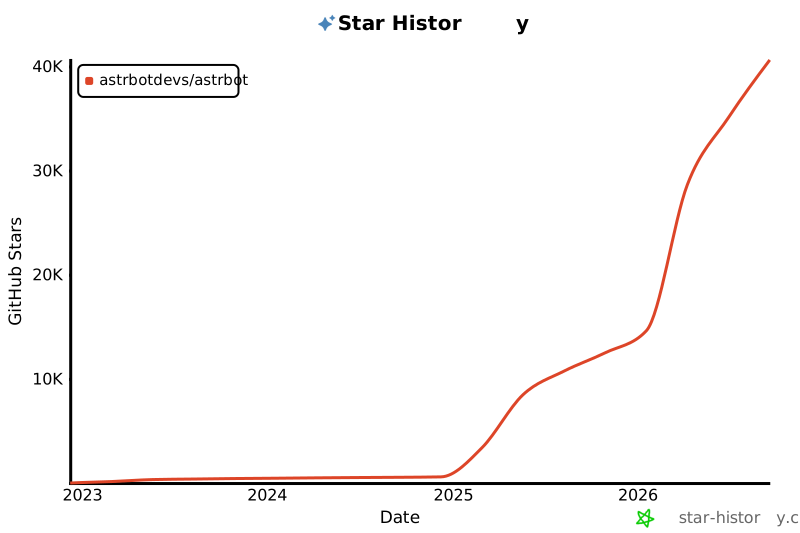](https://star-history.com/#astrbotdevs/astrbot&Date)
_陪伴与能力从来不应该是对立面。我们希望创造的是一个既能理解情绪、给予陪伴,也能可靠完成工作的机器人。_
_私は、高性能ですから!_