# gpower-mobile-editor
**Repository Path**: swallow_week/gpower-mobile-editor
## Basic Information
- **Project Name**: gpower-mobile-editor
- **Description**: 基于vue-html5-editor 二次开发的移动端编辑器
- **Primary Language**: Unknown
- **License**: Apache-2.0
- **Default Branch**: master
- **Homepage**: None
- **GVP Project**: No
## Statistics
- **Stars**: 0
- **Forks**: 0
- **Created**: 2024-01-19
- **Last Updated**: 2024-01-19
## Categories & Tags
**Categories**: Uncategorized
**Tags**: None
## README
# 简介 Intro
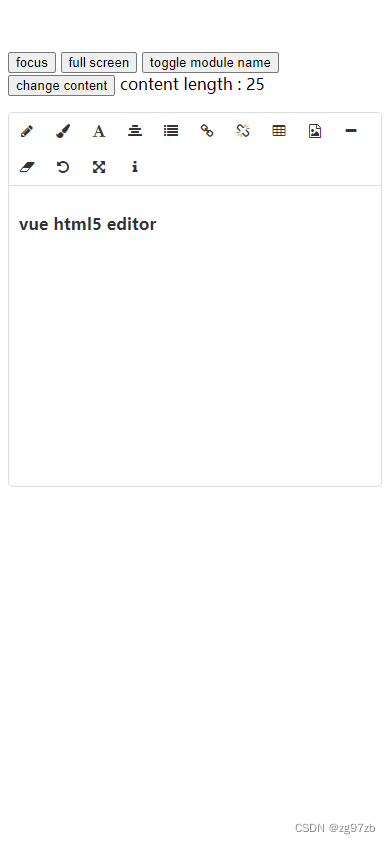
gpower-mobile-editor 是一个 Vue 的富文本编辑器插件,简洁灵活可扩展,适用于 vue2.0 以上版本,支持 IE11.
gpower-mobile-editor is an html5 wysiwyg editor for vue,easy and flexible,compatible with Vue.js 2.0+,support IE11.
# 安装 Installation
### Npm
```bash
npm install gpower-mobile-editor --save-dev
```
引入并安装作为全局组件
import and install as global component
```js
import Vue from "vue";
import MobileEditor from "gpower-mobile-editor";
Vue.use(MobileEditor, options);
```
同样你也可以作为局部组件使用,方便在不同的场景里使用不同的配置.
```js
const editor1 = new MobileEditor(options1);
const app1 = new Vue({
components: {
editor1,
},
});
const editor2 = new MobileEditor(options2);
const app2 = new Vue({
components: {
editor2,
},
});
```
### 浏览器直接使用 browser
```html
```
通过全局变量`MobileEditor`来安装.
Install using global variable `MobileEditor`.
```js
Vue.use(MobileEditor, options);
```
# 使用说明 Usage
模板代码如下:
template code as follows:
```html
```
# options
```js
Vue.use(MobileEditor, {
// 全局组件名称,使用new MobileEditor(options)时该选项无效
// global component name
name: "gpower-mobile-editor",
// 是否显示模块名称,开启的话会在工具栏的图标后台直接显示名称
// if set true,will append module name to toolbar after icon
showModuleName: false,
font: {
fontNames: [], // 字体
lineHeights: [], // 行高
fontSizes: [], // 字体大小
},
// 自定义各个图标的class,默认使用的是font-awesome提供的图标
// custom icon class of built-in modules,default using font-awesome
icons: {
text: "fa fa-pencil",
color: "fa fa-paint-brush",
font: "fa fa-font",
align: "fa fa-align-justify",
list: "fa fa-list",
link: "fa fa-chain",
unlink: "fa fa-chain-broken",
tabulation: "fa fa-table",
image: "fa fa-file-image-o",
hr: "fa fa-minus",
eraser: "fa fa-eraser",
undo: "fa-undo fa",
"full-screen": "fa fa-arrows-alt",
info: "fa fa-info",
},
// 配置图片模块
// config image module
image: {
// 文件最大体积,单位字节 max file size
sizeLimit: 512 * 1024,
// 上传参数,默认把图片转为base64而不上传
// upload config,default null and convert image to base64
upload: {
url: null,
headers: {},
params: {},
fieldName: {},
},
// 压缩参数,默认使用localResizeIMG进行压缩,设置为null禁止压缩
// compression config,default resize image by localResizeIMG (https://github.com/think2011/localResizeIMG)
// set null to disable compression
compress: {
width: 1600,
height: 1600,
quality: 80,
},
// 响应数据处理,最终返回图片链接
// handle response data,return image url
uploadHandler(responseText) {
//default accept json data like {ok:false,msg:"unexpected"} or {ok:true,data:"image url"}
var json = JSON.parse(responseText);
if (!json.ok) {
alert(json.msg);
} else {
return json.data;
}
},
},
// 语言,内建的有英文(en-us)和中文(zh-cn)
//default en-us, en-us and zh-cn are built-in
language: "zh-cn",
// 自定义语言
i18n: {
//specify your language here
"zh-cn": {
align: "对齐方式",
image: "图片",
list: "列表",
link: "链接",
unlink: "去除链接",
table: "表格",
font: "文字",
"full screen": "全屏",
text: "排版",
eraser: "格式清除",
info: "关于",
color: "颜色",
"please enter a url": "请输入地址",
"create link": "创建链接",
bold: "加粗",
italic: "倾斜",
underline: "下划线",
"strike through": "删除线",
subscript: "上标",
superscript: "下标",
heading: "标题",
"font name": "字体",
"font size": "文字大小",
"left justify": "左对齐",
"center justify": "居中",
"right justify": "右对齐",
"ordered list": "有序列表",
"unordered list": "无序列表",
"fore color": "前景色",
"background color": "背景色",
"row count": "行数",
"column count": "列数",
save: "确定",
upload: "上传",
progress: "进度",
unknown: "未知",
"please wait": "请稍等",
error: "错误",
abort: "中断",
reset: "重置",
},
},
// 隐藏不想要显示出来的模块
// the modules you don't want
hiddenModules: [],
// 自定义要显示的模块,并控制顺序
// keep only the modules you want and customize the order.
// can be used with hiddenModules together
visibleModules: [
"text",
"color",
"font",
"align",
"list",
"link",
"unlink",
"tabulation",
"image",
"hr",
"eraser",
"undo",
"full-screen",
"info",
],
// 扩展模块,具体可以参考examples或查看源码
// extended modules
modules: {
//omit,reference to source code of build-in modules
},
});
```
# 组件属性 attributes
```html
```
### content
编辑内容
The html content to edit
### height
编辑器高度,如果设置了`auto-height`为 true,将设置为编辑器的最小高度.
The height or min-height ( if auto-height is true ) of editor.
### z-index
层级,将会设置编辑器容量的`z-index`样式属性,默认为 1000.
Sets z-index style property of editor,default 1000.
### auto-height
是否自动根据内容控制编辑器高度,默认为 true.
Resize editor height automatically,default true.
### show-module-name
局部设置是否显示模块名称,会覆盖全局的设定.
Set `showModuleName` locally.
# 事件
```html
```
### change
每次内容有变动时触发,回传改变后的内容.
Emited when the content changes,and pass the current content as event data.
# License
[Apache-2.0](http://opensource.org/licenses/Apache-2.0)