# RichText
**Repository Path**: unionbt/RichText
## Basic Information
- **Project Name**: RichText
- **Description**: No description available
- **Primary Language**: Unknown
- **License**: MIT
- **Default Branch**: main
- **Homepage**: None
- **GVP Project**: No
## Statistics
- **Stars**: 0
- **Forks**: 0
- **Created**: 2021-11-10
- **Last Updated**: 2026-07-08
## Categories & Tags
**Categories**: Uncategorized
**Tags**: None
## README
# RichText
A modern, powerful, and type-safe SwiftUI component for rendering HTML content with extensive styling options, async/await support, media interaction, and comprehensive error handling. Built for Swift 5.9+ and optimized for iOS 15.0+ and macOS 12.0+.

| Welcome to RichText
A powerful HTML renderer for SwiftUI.
"""
var body: some View {
ScrollView {
RichText(html: htmlContent)
}
}
}
```
### Enhanced Example
Add styling, media handling, and error handling:
```swift
struct ContentView: View {
let htmlContent = """
Welcome to RichText
A powerful HTML renderer with extensive customization .
Visit our GitHub
"""
var body: some View {
ScrollView {
RichText(html: htmlContent)
.colorScheme(.auto) // Auto light/dark mode
.lineHeight(170) // Line height percentage
.imageRadius(12) // Rounded image corners
.transparentBackground() // Transparent background
.placeholder { // Loading Placeholder
Text("Loading email...")
}
.onMediaClick { media in // Handle media clicks
switch media {
case .image(let src):
print("Image clicked: \(src)")
case .video(let src):
print("Video clicked: \(src)")
}
}
.onError { error in // Handle errors
print("RichText error: \(error)")
}
}
}
}
```
---
## 📦 Installation
### Swift Package Manager (Recommended)
1. In Xcode, select **File → Add Package Dependencies...**
2. Enter the repository URL:
```
https://github.com/NuPlay/RichText.git
```
3. Select version rule: **"Up to Next Major Version"** from **"3.0.0"**
4. Click **Add Package**
### Manual Package.swift
Add RichText to your `Package.swift`:
```swift
dependencies: [
.package(url: "https://github.com/NuPlay/RichText.git", .upToNextMajor(from: "3.0.0"))
],
targets: [
.target(
name: "YourTarget",
dependencies: ["RichText"]
)
]
```
---
## 📚 Complete API Reference
### Core Components
#### RichText Initializers
```swift
// Basic initializer
RichText(html: String)
// With configuration
RichText(html: String, configuration: Configuration)
// With placeholder
RichText(html: String, placeholder: AnyView?)
// Full initializer
RichText(html: String, configuration: Configuration, placeholder: AnyView?)
```
### Styling Modifiers
#### Background Colors
```swift
// Recommended approaches (v3.0.0+)
.transparentBackground() // Transparent (default)
.backgroundColor(.system) // System default (white/black)
.backgroundColorHex("FF0000") // Hex color
.backgroundColorSwiftUI(.blue) // SwiftUI Color
.backgroundColor(.color(.green)) // Using BackgroundColor enum
// Legacy approach (still works, but deprecated)
.backgroundColor("transparent") // Deprecated but backward compatible
```
#### Typography & Colors
```swift
// Font configuration
.fontType(.system) // System font (default)
.fontType(.monospaced) // Monospaced font
.fontType(.italic) // Italic font
.fontType(.customName("Helvetica")) // Custom font by name
.fontType(.custom(UIFont.systemFont(ofSize: 16))) // Custom UIFont (iOS only)
// Text colors - Modern API (v3.0.0+)
.textColor(light: .primary, dark: .primary) // Modern semantic naming
// Legacy text colors (deprecated but supported)
.foregroundColor(light: .primary, dark: .primary) // SwiftUI Colors (deprecated)
.foregroundColor(light: UIColor.black, dark: UIColor.white) // UIColors (deprecated)
.foregroundColor(light: NSColor.black, dark: NSColor.white) // NSColors (deprecated)
// Link colors
.linkColor(light: .blue, dark: .cyan) // SwiftUI Colors
.linkColor(light: UIColor.blue, dark: UIColor.cyan) // UIColors
// Color enforcement
.colorPreference(forceColor: .onlyLinks) // Force only link colors (default)
.colorPreference(forceColor: .all) // Force all colors
.colorPreference(forceColor: .none) // Don't force any colors
```
#### Layout & Spacing
```swift
.lineHeight(170) // Line height percentage (default: 170)
.imageRadius(12) // Image border radius in points (default: 0)
.colorScheme(.auto) // .auto (default), .light, .dark
.forceColorSchemeBackground(true) // Force background color override
```
#### Link Behavior
```swift
.linkOpenType(.Safari) // Open in Safari (default)
.linkOpenType(.SFSafariView()) // Open in SFSafariViewController (iOS)
.linkOpenType(.SFSafariView( // Advanced SFSafariView config
configuration: config,
isReaderActivated: true,
isAnimated: true
))
.linkOpenType(.custom { url in // Custom link handler
// Handle URL yourself
})
.linkOpenType(.none) // Don't handle link taps
```
### Advanced Features
#### Loading States
```swift
// Loading placeholders (Modern approach - recommended)
.placeholder { // Custom placeholder view
HStack(spacing: 8) {
ProgressView()
.scaleEffect(0.8)
Text("Loading content...")
.foregroundColor(.secondary)
}
.frame(minHeight: 60)
}
// Deprecated methods (still supported for backward compatibility)
.loadingPlaceholder("Loading...") // Deprecated - use placeholder {}
.loadingText("Please wait...") // Deprecated - use placeholder {}
// Loading transitions
.loadingTransition(.fade) // Fade transition
.loadingTransition(.slide) // Slide transition
.loadingTransition(.scale) // Scale transition
.loadingTransition(.custom(.easeInOut)) // Custom animation
.transition(.easeOut) // Legacy transition method
```
#### Event Handling
```swift
// Media click events (v3.0.0+)
.onMediaClick { media in
switch media {
case .image(let src):
// Handle image clicks
presentImageViewer(src)
case .video(let src):
// Handle video clicks
presentVideoPlayer(src)
}
}
// Error handling (v3.0.0+)
.onError { error in
switch error {
case .htmlLoadingFailed(let html):
print("Failed to load HTML: \(html)")
case .webViewConfigurationFailed:
print("WebView configuration failed")
case .cssGenerationFailed:
print("CSS generation failed")
case .mediaHandlingFailed(let media):
print("Media handling failed: \(media)")
}
}
```
#### Custom Styling
```swift
// Custom CSS
.customCSS("""
p { margin: 10px 0; }
h1 { color: #ff6b6b; }
img { box-shadow: 0 2px 8px rgba(0,0,0,0.1); }
""")
// Base URL for relative resources
.baseURL(Bundle.main.bundleURL)
```
### Configuration-Based Initialization
For complex configurations, create a `Configuration` object:
```swift
let config = Configuration(
customCSS: "body { padding: 20px; }",
supportsDynamicType: true, // Enable Dynamic Type
fontType: .system,
fontColor: ColorSet(light: "333333", dark: "CCCCCC"),
lineHeight: 180,
colorScheme: .auto,
forceColorSchemeBackground: false,
backgroundColor: .transparent,
imageRadius: 8,
linkOpenType: .Safari,
linkColor: ColorSet(light: "007AFF", dark: "0A84FF", isImportant: true),
baseURL: Bundle.main.bundleURL,
mediaClickHandler: { media in /* handle clicks */ },
errorHandler: { error in /* handle errors */ },
isColorsImportant: .onlyLinks,
transition: .easeInOut(duration: 0.3)
)
RichText(html: htmlContent, configuration: config)
```
### Utility Methods
```swift
// Generate CSS programmatically (v3.0.0+)
let richText = RichText(html: html)
let css = richText.generateCSS(colorScheme: .light, alignment: .center)
// Generate CSS from configuration
let config = Configuration(lineHeight: 150)
let css = config.generateCompleteCSS(colorScheme: .dark)
```
---
## 🆕 What's New in v3.0.0
### 🚀 **Core Modernization**
- **⚡ Async/Await Architecture**: Complete rewrite using modern Swift concurrency for better performance and reliability
- **🛡️ Enhanced Type Safety**: Robust ColorSet equality comparison and validation with RGBA-based color handling
- **⚙️ Performance Optimizations**: Frame update debouncing, improved WebView management, and reduced main thread blocking
- **📊 Comprehensive Logging**: Built-in performance monitoring with os.log integration
### 🎨 **Enhanced User Experience**
- **🎨 Type-Safe Background Colors**: Complete background color system with `.transparent`, `.system`, `.hex()`, and `.color()` support
- **📱 Interactive Media Handling**: Full media click event system for images and videos with custom action support
- **🔧 Improved Font System**: Better monospace and italic rendering with enhanced CSS generation
- **🔄 Modern Loading States**: Type-safe loading transitions with `.fade`, `.scale`, `.slide`, and custom animations
### 🛠️ **Developer Experience**
- **🧪 Swift Testing Migration**: Complete migration from XCTest to modern Swift Testing framework
- **📖 Semantic API Naming**: Modern APIs like `.textColor()` replacing `.foregroundColor()` for better clarity
- **🚨 Comprehensive Error Handling**: Detailed error types with custom callbacks and debugging support
- **🛠️ Public CSS Access**: Programmatic CSS generation and access for advanced customization scenarios
- **🌐 Enhanced HTML5 Support**: Complete support for ``, ``, ``, ``, and semantic elements
### 🔄 **Migration & Compatibility**
- **✅ 100% Backward Compatible**: All v2.x code works without changes
- **⚠️ Thoughtful Deprecations**: Deprecated methods include clear migration guidance
- **📚 Migration Tooling**: Built-in TestApp with Modern API demo and migration examples
### 🔄 **Backward Compatibility Promise**
Version 3.0.0 maintains **100% backward compatibility** for v2.x users while providing a clear path to modern APIs:
- ✅ **Zero Breaking Changes**: All existing v2.x code works unchanged
- ✅ **Automatic Performance**: Better async/await performance and font rendering without code changes
- ✅ **Guided Migration**: Helpful deprecation warnings with clear modern API alternatives
- ✅ **Additive Enhancement**: New features are optional and don't affect existing functionality
- ✅ **Future-Proof**: Modern architecture ready for Swift 6+ and future iOS/macOS versions
### 🎯 **Recommended Migration Path**
1. **Update to v3.0.0**: Immediate performance and reliability improvements
2. **Add Error Handling**: Use `.onError()` for better debugging and user experience
3. **Modernize APIs**: Replace deprecated methods with type-safe alternatives
4. **Enhance Interactivity**: Add `.onMediaClick()` for rich media experiences
5. **Improve Loading UX**: Implement `.placeholder {}` and modern transitions
---
## 🔧 Advanced Usage
### Custom Fonts
#### Using System-Installed Fonts
```swift
RichText(html: html)
.fontType(.customName("SF Mono")) // System monospace font
.fontType(.customName("Helvetica")) // System Helvetica
```
#### Using Bundled Fonts
```swift
RichText(html: html)
.fontType(.customName("CustomFont-Regular"))
.customCSS("""
@font-face {
font-family: 'CustomFont-Regular';
src: url("CustomFont-Regular.ttf") format('truetype');
}
""")
```
#### Dynamic Type Support
```swift
let config = Configuration(
supportsDynamicType: true // Automatically use iOS Dynamic Type
)
RichText(html: html, configuration: config)
```
### Complex Color Schemes
#### Gradient Backgrounds
```swift
RichText(html: html)
.backgroundColor(.transparent)
.customCSS("""
body {
background: linear-gradient(45deg, #ff6b6b, #4ecdc4);
padding: 20px;
border-radius: 12px;
}
""")
```
#### Theme-Aware Colors
```swift
RichText(html: html)
.foregroundColor(light: .primary, dark: .primary)
.linkColor(light: .blue, dark: .cyan)
.backgroundColor(.system)
.colorPreference(forceColor: .all) // Override HTML colors
```
### Interactive Media Handling
```swift
struct ContentView: View {
@State private var selectedImage: String?
var body: some View {
RichText(html: htmlWithImages)
.onMediaClick { media in
switch media {
case .image(let src):
selectedImage = src
case .video(let src):
openVideoPlayer(url: src)
}
}
.fullScreenCover(item: Binding(
get: { selectedImage },
set: { selectedImage = $0 }
)) { imageURL in
ImageViewer(url: imageURL)
}
}
}
```
### Error Handling and Debugging
```swift
struct ContentView: View {
@State private var lastError: RichTextError?
var body: some View {
VStack {
if let error = lastError {
ErrorBanner(error: error)
}
RichText(html: html)
.onError { error in
lastError = error
// Log to analytics
Analytics.log("RichText Error", parameters: [
"error_type": String(describing: error),
"html_length": html.count
])
}
}
}
}
```
### Performance Optimization
#### For Large Content
```swift
RichText(html: largeHtmlContent)
.imageRadius(0) // Disable image styling for performance
.customCSS("""
img {
max-width: 100%;
height: auto;
loading: lazy; /* Native lazy loading */
}
""")
.loadingTransition(.none) // Disable transitions for faster rendering
```
#### Memory Management
```swift
struct ContentView: View {
@StateObject private var htmlManager = HTMLContentManager()
var body: some View {
RichText(html: htmlManager.currentHTML)
.onError { error in
htmlManager.handleError(error)
}
.onDisappear {
htmlManager.cleanup() // Custom cleanup logic
}
}
}
```
---
## 💡 Examples
### Blog Post Renderer
```swift
struct BlogPostView: View {
let post: BlogPost
var body: some View {
ScrollView {
VStack(alignment: .leading, spacing: 16) {
Text(post.title)
.font(.largeTitle)
.fontWeight(.bold)
RichText(html: post.content)
.lineHeight(175)
.imageRadius(8)
.backgroundColor(.system)
.linkOpenType(.SFSafariView())
.onMediaClick { media in
handleMediaClick(media)
}
.customCSS("""
blockquote {
border-left: 4px solid #007AFF;
padding-left: 16px;
margin: 16px 0;
font-style: italic;
}
code {
background-color: #f5f5f5;
padding: 2px 4px;
border-radius: 3px;
}
""")
}
.padding()
}
}
private func handleMediaClick(_ media: MediaClickType) {
// Custom media handling
}
}
```
### Email Content Viewer
```swift
struct EmailView: View {
let emailHTML: String
@State private var isLoading = true
var body: some View {
RichText(html: emailHTML)
.backgroundColor(.system)
.lineHeight(160)
.fontType(.system)
.linkOpenType(.custom { url in
// Custom link handling for email safety
if url.host?.contains("trusted-domain.com") == true {
UIApplication.shared.open(url)
} else {
showLinkConfirmation(url)
}
})
.placeholder {
Text("Loading email...")
}
.loadingTransition(.fade)
.onError { error in
print("Email loading error: \(error)")
}
}
private func showLinkConfirmation(_ url: URL) {
// Show confirmation dialog
}
}
```
### Documentation Viewer
```swift
struct DocumentationView: View {
let markdownHTML: String
var body: some View {
NavigationView {
RichText(html: markdownHTML)
.fontType(.system)
.lineHeight(170)
.backgroundColor(.transparent)
.customCSS("""
h1, h2, h3 {
color: #1d4ed8;
margin-top: 24px;
margin-bottom: 12px;
}
pre {
background-color: #f8f9fa;
padding: 12px;
border-radius: 6px;
overflow-x: auto;
}
code {
font-family: 'SF Mono', 'Monaco', 'Consolas', monospace;
}
""")
.navigationTitle("Documentation")
.navigationBarTitleDisplayMode(.large)
}
}
}
```
---
## 🐛 Troubleshooting
### Common Issues
#### Content Not Displaying
**Problem**: RichText shows blank or doesn't render content
**Solutions**:
- Ensure HTML is valid and well-formed
- Check that images have proper URLs
- Verify network permissions for external resources
- Add error handling to debug loading issues
```swift
RichText(html: html)
.onError { error in
print("Debug error: \(error)")
}
```
#### Images Not Loading
**Problem**: Images don't appear in the rendered content
**Solutions**:
- Verify image URLs are accessible
- For macOS: Enable "Outgoing Connections (Client)" in App Sandbox
- Use base URL for relative image paths
```swift
RichText(html: html)
.baseURL(Bundle.main.bundleURL) // For bundled resources
```
#### Performance Issues
**Problem**: Slow rendering with large HTML content
**Solutions**:
- Simplify CSS and reduce inline styles
- Use image compression for better loading
- Consider pagination for very large content
- Disable animations for better performance
```swift
RichText(html: largeContent)
.loadingTransition(.none)
.imageRadius(0)
```
#### Dark Mode Issues
**Problem**: Colors don't adapt properly to dark mode
**Solutions**:
- Use `.colorScheme(.auto)` for automatic adaptation
- Set proper light/dark colors for text and links
- Force color scheme background if needed
```swift
RichText(html: html)
.colorScheme(.auto)
.forceColorSchemeBackground(true)
.foregroundColor(light: .black, dark: .white)
```
### Platform-Specific Issues
#### macOS Specific
**Issue**: External resources don't load
- **Solution**: Enable "Outgoing Connections (Client)" in App Sandbox settings
- **Alternative**: Use bundled resources or file URLs
**Issue**: Scrolling behavior differs from iOS
- **Solution**: This is expected due to platform differences
- **Workaround**: Embed in a ScrollView for consistent behavior
#### iOS Specific
**Issue**: SFSafariViewController not presenting
- **Solution**: Ensure you have a presented view controller
- **Alternative**: Use `.linkOpenType(.Safari)` as fallback
### Memory Management
If you experience memory issues with large content:
```swift
// Implement proper cleanup
struct ContentView: View {
@State private var html = ""
var body: some View {
RichText(html: html)
.onDisappear {
html = "" // Clear content when not visible
}
}
}
```
### Getting Help
1. **Check the Issues**: Search [GitHub Issues](https://github.com/NuPlay/RichText/issues) for similar problems
2. **Provide Details**: When reporting issues, include:
- iOS/macOS version
- RichText version
- Sample HTML content
- Error messages or console output
3. **Create Minimal Example**: Provide a minimal reproducible example
---
## 📖 Migration Guide
### From v2.x to v3.0.0
#### Background Colors
```swift
// ✅ v2.7.0 - Still works, but deprecated
RichText(html: html)
.backgroundColor("transparent") // Deprecated but functional
// 🚀 v3.0.0 - Recommended approaches
RichText(html: html)
.transparentBackground() // Easiest for transparent
.backgroundColorHex("#FF0000") // For hex colors
.backgroundColorSwiftUI(.blue) // For SwiftUI colors
.backgroundColor(.system) // For system colors
```
#### Enhanced Features (Optional Upgrades)
```swift
// 🚀 Add error handling
RichText(html: html)
.onError { error in
print("Error: \(error)")
}
// 🚀 Add interactive media handling
RichText(html: html)
.onMediaClick { media in
switch media {
case .image(let src):
presentImageViewer(src)
case .video(let src):
presentVideoPlayer(src)
}
}
// 🚀 Better loading experience with custom view
RichText(html: html)
.placeholder {
HStack(spacing: 8) {
ProgressView()
.scaleEffect(0.8)
Text("Loading...")
.foregroundColor(.secondary)
}
.frame(minHeight: 60)
}
.loadingTransition(.fade)
```
#### Font & Color API Modernization
```swift
// ✅ v2.x - Still works, but deprecated
RichText(html: html)
.foregroundColor(light: .black, dark: .white) // Deprecated
// 🚀 v3.0.0 - Modern semantic naming
RichText(html: html)
.textColor(light: .black, dark: .white) // Modern & clear
```
#### Enhanced Font Rendering
No changes needed - font rendering is automatically improved:
```swift
// ✅ Automatically better in v3.0.0 with async/await
RichText(html: html)
.fontType(.monospaced) // Enhanced rendering
.fontType(.italic) // Improved CSS generation
```
### Recommended Migration Steps
1. **Update to v3.0.0**: Your existing code continues to work
2. **Add Error Handling**: Use `.onError()` for better debugging
3. **Update Background Colors**: Replace string-based with type-safe methods
4. **Add Media Handling**: Use `.onMediaClick()` for interactive content
5. **Improve Loading UX**: Add `.placeholder {}` with custom views and transitions
---
## 🤝 Contributing
We welcome contributions! Here's how you can help:
### Reporting Issues
- Use [GitHub Issues](https://github.com/NuPlay/RichText/issues) for bug reports
- Include reproduction steps and sample code
- Specify iOS/macOS version and RichText version
### Suggesting Features
- Create a [Discussion](https://github.com/NuPlay/RichText/discussions) for feature requests
- Explain the use case and expected behavior
- Consider backward compatibility implications
### Code Contributions
1. **Fork** the repository
2. **Create** a feature branch (`git checkout -b feature/amazing-feature`)
3. **Write** tests for your changes
4. **Commit** your changes (`git commit -m 'Add amazing feature'`)
5. **Push** to the branch (`git push origin feature/amazing-feature`)
6. **Open** a Pull Request
### Development Guidelines
- Follow Swift naming conventions and modern async/await patterns
- Add comprehensive documentation for public APIs with usage examples
- Ensure backward compatibility and provide clear migration paths
- Use Swift Testing for all new test coverage
- Update README.md and TestApp for new features
- Consider performance implications and use os.log for debugging
---
## 📄 License
RichText is available under the MIT license. See the [LICENSE](LICENSE) file for more info.
---
## 🙏 Acknowledgments
- Built with [WebKit](https://webkit.org/) for reliable HTML rendering
- Inspired by the SwiftUI community's need for rich text solutions
- Thanks to all [contributors](https://github.com/NuPlay/RichText/contributors) and users
---
## 📞 Support
- **Issues**: [GitHub Issues](https://github.com/NuPlay/RichText/issues)
- **Discussions**: [GitHub Discussions](https://github.com/NuPlay/RichText/discussions)
---
*Made with ❤️ for the SwiftUI community* 


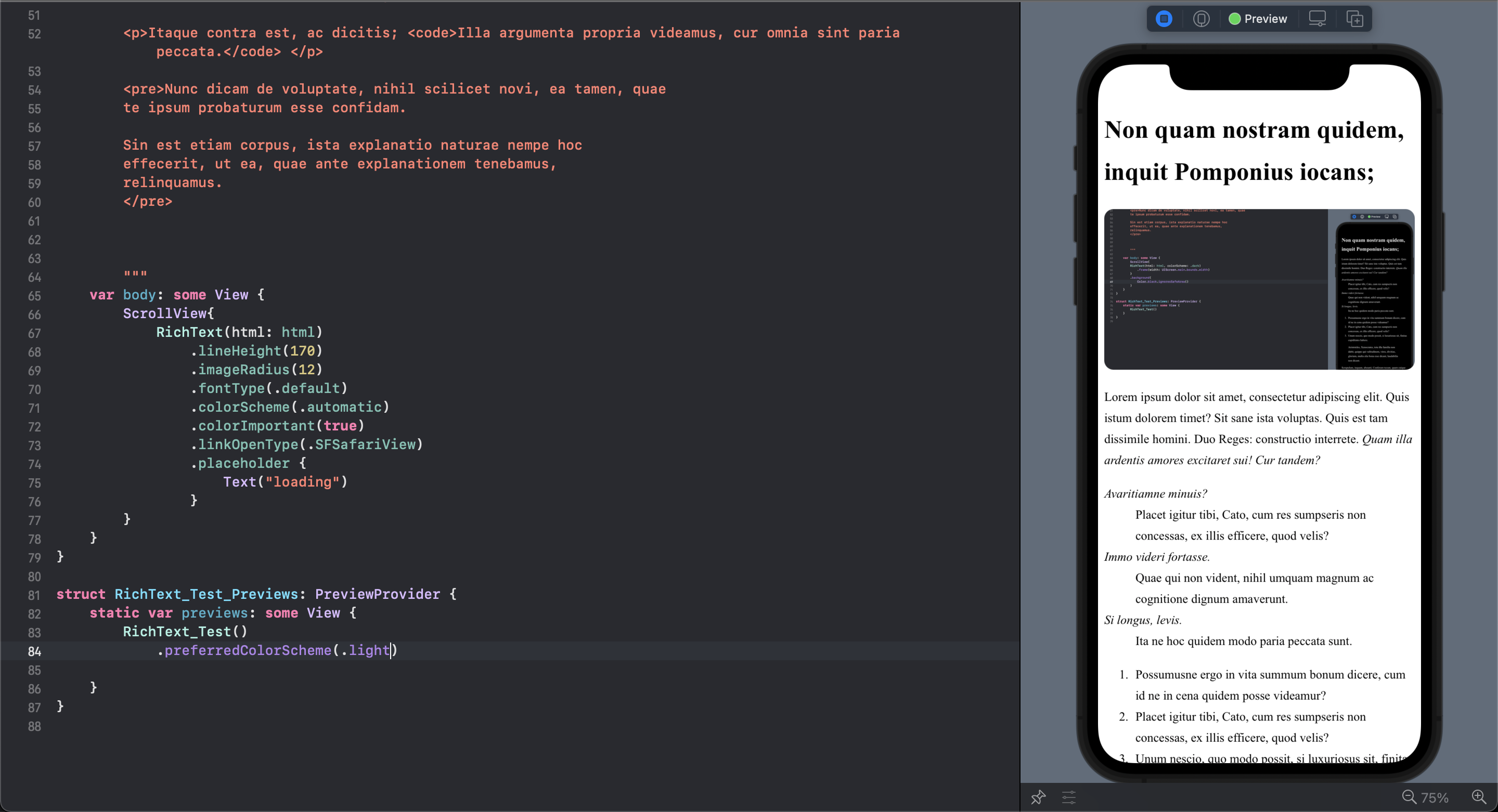 |
|  |
|:--------------------------------------------------------------------------------------------------------------------------------------------------------------------: |:------------------------------------------------------------------------------------------------------------------------------: |
| Light Mode | Dark Mode |
---
## Table of Contents
- [✨ Features](#-features)
- [🌟 Used By](#-used-by)
- [🚀 Quick Start](#-quick-start)
- [📦 Installation](#-installation)
- [📚 Complete API Reference](#-complete-api-reference)
- [🆕 What's New in v3.0.0](#-whats-new-in-v300)
- [🔧 Advanced Usage](#-advanced-usage)
- [💡 Examples](#-examples)
- [🐛 Troubleshooting](#-troubleshooting)
- [📖 Migration Guide](#-migration-guide)
- [🤝 Contributing](#-contributing)
---
## ✨ Features
### 🚀 **v3.0.0 - Modern Architecture**
- ⚡ **Async/Await Support**: Modern Swift concurrency for better performance
- 🛡️ **Type Safety**: Comprehensive Swift type safety with robust error handling
- 🧪 **Swift Testing**: Modern testing framework with extensive test coverage
- 🔧 **Backward Compatible**: 100% compatibility with v2.x while providing modern APIs
### 📱 **Platform Support**
- 📱 **Cross-platform**: iOS 15.0+ and macOS 12.0+ with Swift 5.9+
- 🎨 **Theme Support**: Automatic light/dark mode with custom color schemes
- 🔤 **Typography**: System fonts, custom fonts, monospace, italic, and Dynamic Type support
### 🎛️ **Rich Features**
- 🖼️ **Interactive Media**: Click events for images/videos with custom handling
- 🔗 **Smart Link Management**: Safari, SFSafariView, and custom link handlers
- 🎨 **Advanced Styling**: Type-safe background colors, CSS customization
- 📐 **Responsive Layout**: Dynamic height calculation with smooth transitions
- 🔄 **Loading States**: Configurable placeholders with animation support
- 🌐 **HTML5 Complete**: Full support for modern semantic elements
- 🚨 **Error Handling**: Comprehensive error types with custom callbacks
---
## 🌟 Used By
RichText is used in public Swift projects such as:
- [IBM/mac-ibm-notifications](https://github.com/IBM/mac-ibm-notifications) - macOS notification and alert agent
- [AudioBooth/AudioBooth](https://github.com/AudioBooth/AudioBooth) - iOS companion app for Audiobookshelf
No affiliation or endorsement implied. Using RichText in your project? Feel free to open a PR to add it here.
---
## 🚀 Quick Start
### Basic Usage
The simplest way to get started with RichText:
```swift
import SwiftUI
import RichText
struct ContentView: View {
let htmlContent = """
|
|:--------------------------------------------------------------------------------------------------------------------------------------------------------------------: |:------------------------------------------------------------------------------------------------------------------------------: |
| Light Mode | Dark Mode |
---
## Table of Contents
- [✨ Features](#-features)
- [🌟 Used By](#-used-by)
- [🚀 Quick Start](#-quick-start)
- [📦 Installation](#-installation)
- [📚 Complete API Reference](#-complete-api-reference)
- [🆕 What's New in v3.0.0](#-whats-new-in-v300)
- [🔧 Advanced Usage](#-advanced-usage)
- [💡 Examples](#-examples)
- [🐛 Troubleshooting](#-troubleshooting)
- [📖 Migration Guide](#-migration-guide)
- [🤝 Contributing](#-contributing)
---
## ✨ Features
### 🚀 **v3.0.0 - Modern Architecture**
- ⚡ **Async/Await Support**: Modern Swift concurrency for better performance
- 🛡️ **Type Safety**: Comprehensive Swift type safety with robust error handling
- 🧪 **Swift Testing**: Modern testing framework with extensive test coverage
- 🔧 **Backward Compatible**: 100% compatibility with v2.x while providing modern APIs
### 📱 **Platform Support**
- 📱 **Cross-platform**: iOS 15.0+ and macOS 12.0+ with Swift 5.9+
- 🎨 **Theme Support**: Automatic light/dark mode with custom color schemes
- 🔤 **Typography**: System fonts, custom fonts, monospace, italic, and Dynamic Type support
### 🎛️ **Rich Features**
- 🖼️ **Interactive Media**: Click events for images/videos with custom handling
- 🔗 **Smart Link Management**: Safari, SFSafariView, and custom link handlers
- 🎨 **Advanced Styling**: Type-safe background colors, CSS customization
- 📐 **Responsive Layout**: Dynamic height calculation with smooth transitions
- 🔄 **Loading States**: Configurable placeholders with animation support
- 🌐 **HTML5 Complete**: Full support for modern semantic elements
- 🚨 **Error Handling**: Comprehensive error types with custom callbacks
---
## 🌟 Used By
RichText is used in public Swift projects such as:
- [IBM/mac-ibm-notifications](https://github.com/IBM/mac-ibm-notifications) - macOS notification and alert agent
- [AudioBooth/AudioBooth](https://github.com/AudioBooth/AudioBooth) - iOS companion app for Audiobookshelf
No affiliation or endorsement implied. Using RichText in your project? Feel free to open a PR to add it here.
---
## 🚀 Quick Start
### Basic Usage
The simplest way to get started with RichText:
```swift
import SwiftUI
import RichText
struct ContentView: View {
let htmlContent = """